You can pay for BetterSTR Simple, Premium Guidebook or Better TV Premium up front for 12, 24 or 36 months instead of month by month. The longer the term, the less each month costs. You choose it one property (or one TV) at a time, so some can be paid ahead while others stay on your regular billing.
Jump to: BetterSTR Simple · Premium Guidebook · Better TV · When the term ends
What it costs
Prices are per property (per TV for Better TV), in US dollars.
| Term | BetterSTR Simple | Premium Guidebook | Better TV Premium |
|---|---|---|---|
| Monthly | $15 a month | $2.99 a month | $4 a month ($3 with Premium Guidebook) |
| 12 months | $153 ($12.75 a month) | $30 ($2.50 a month) | $36 ($3 a month) |
| 24 months | $270 ($11.25 a month) | $54 ($2.25 a month) | $60 ($2.50 a month) |
| 36 months | $360 ($10 a month) | $72 ($2.00 a month) | $72 ($2 a month) |
On BetterSTR Simple the paid-ahead saving is added to your volume discount, and the price never goes below $5 a property a month. If we have agreed a special rate with you, your paid-ahead prices are worked out from that rate. The page always shows your own prices before you confirm.
Premium Guidebook can be paid ahead on either plan. If you are on the per-reservation plan, a paid-ahead property is left off your weekly bill for the whole term, and your other properties carry on per reservation.
Pay ahead for BetterSTR Simple
- Click Subscription in the left-hand menu. This opens the Plan & add-ons page.
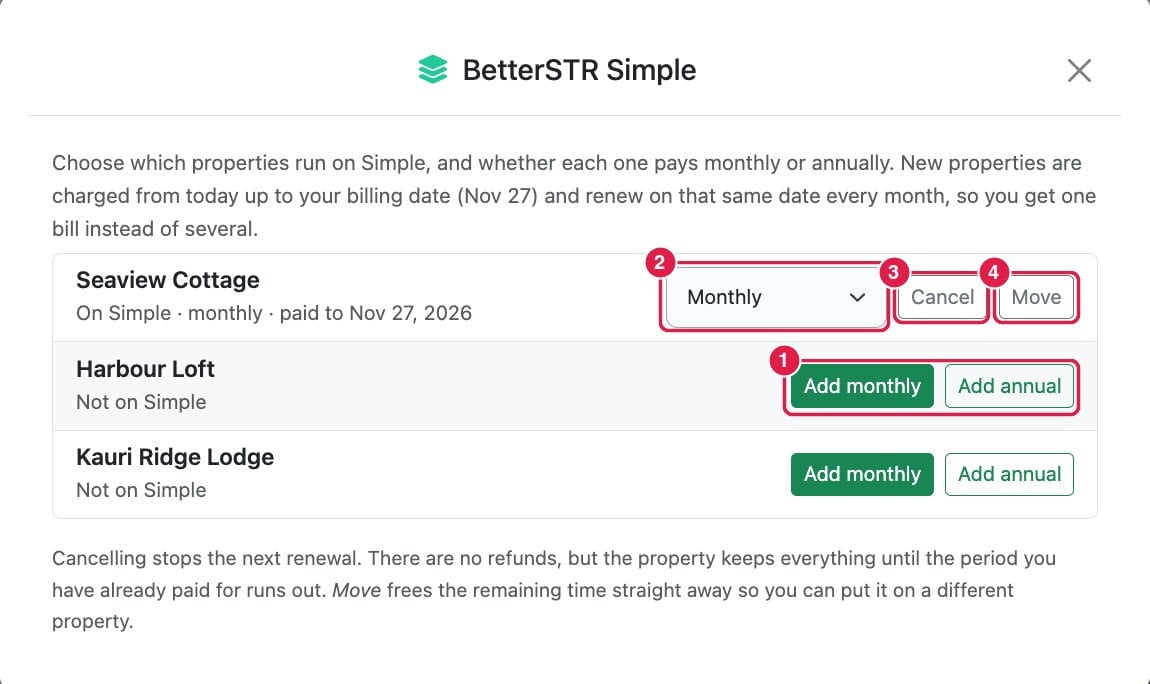
- Find the BetterSTR Simple card and click Manage properties.
- On a property that is not on Simple yet, open Pay ahead… and choose 12, 24 or 36 months.
- On a property that is already monthly, change Monthly to the term you want. The term starts when the month you have already paid for ends.
- Check the amount in the confirmation and confirm.
Pay ahead for Premium Guidebook
- On the same Plan & add-ons page, scroll to the Premium Guidebook section.
- Find Pay ahead and save. Every property is listed with a plan dropdown.
- Open the dropdown on a property and choose 12, 24 or 36 months.
- Check the amount in the confirmation and confirm.
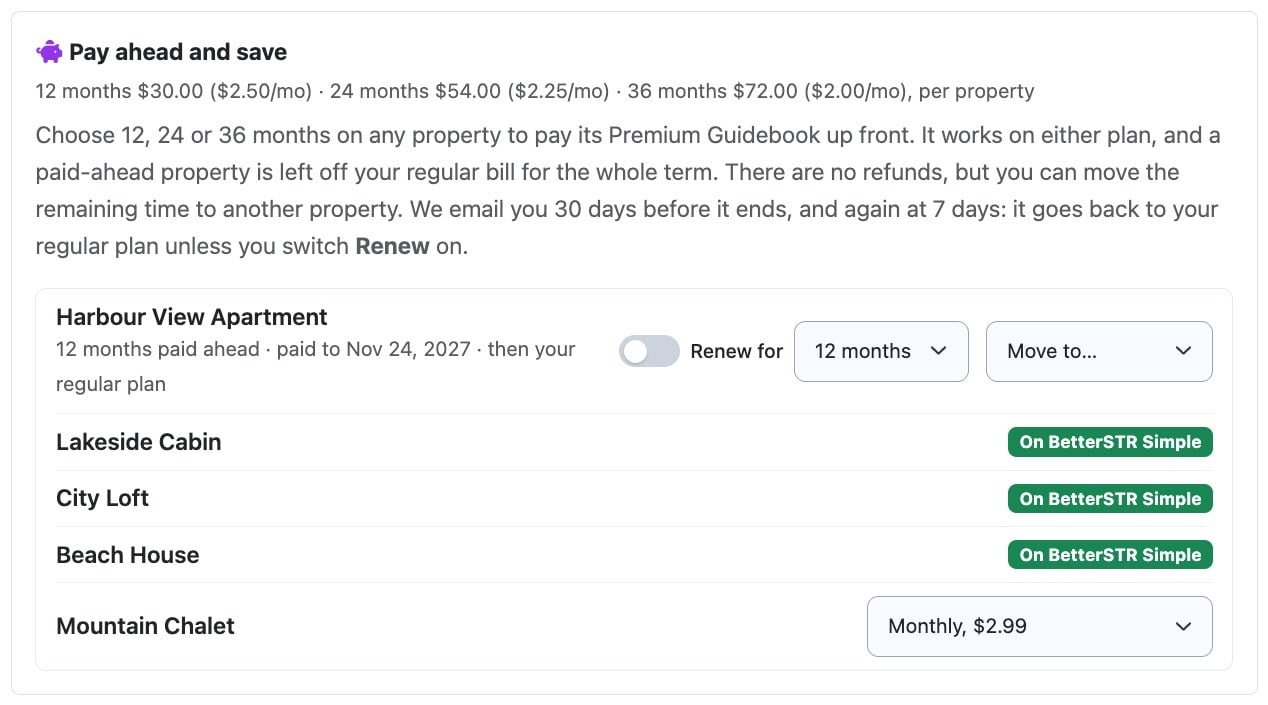
If you don’t have Premium Guidebook yet, paying ahead starts it for that property only. Your other properties stay on the free guidebook until you add them.
Pay ahead for Better TV
- On the same Plan & add-ons page, open Premium TVs (in the Android TV section, or under Manage in the page menu).
- Every TV is listed with its own plan dropdown. Choose 12, 24 or 36 months on a TV to prepay it. It is bought when you choose it, from your balance or your saved card.
- To change TVs between Free and Monthly, set the dropdowns and click Save changes. Set all to Monthly and Set all to Free change every TV at once.
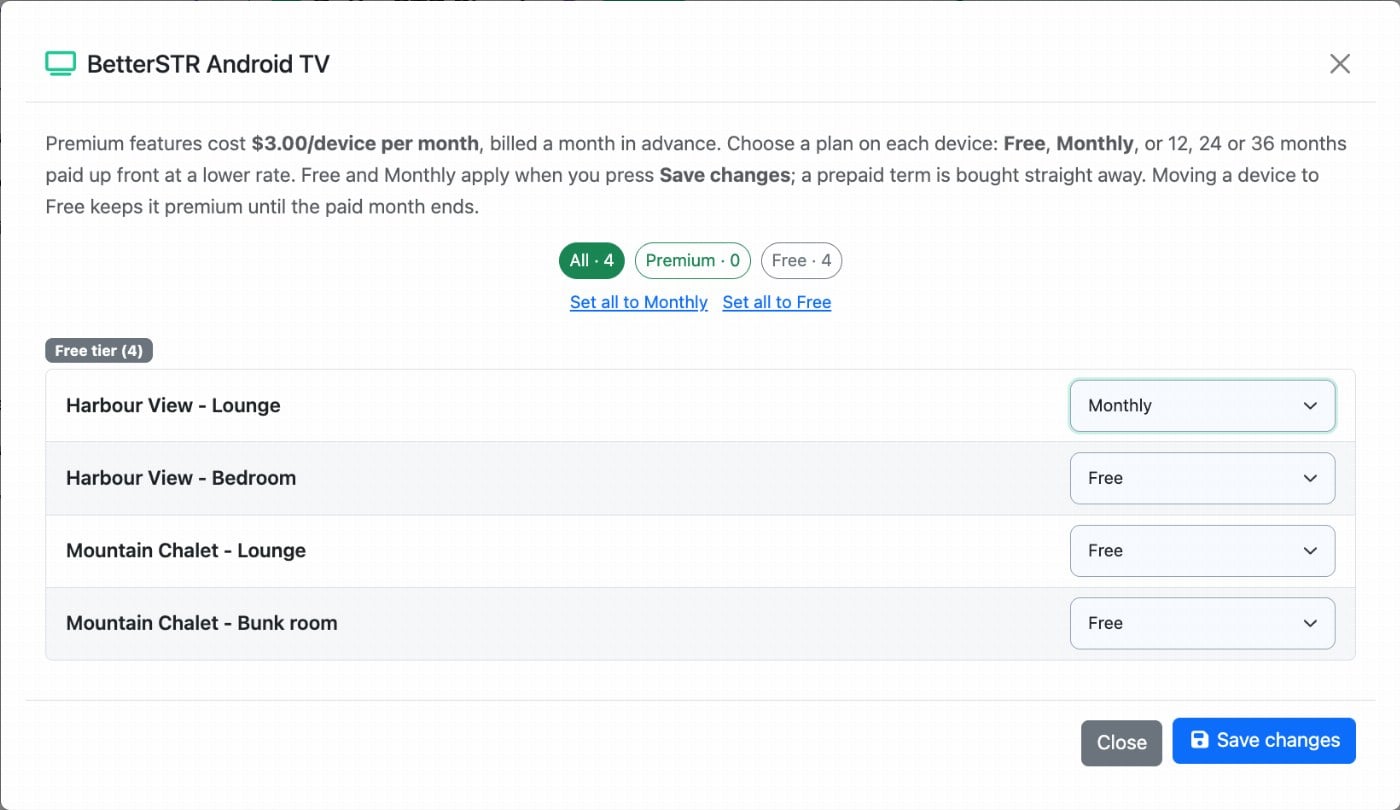
A prepaid TV stays Premium for the whole term with no monthly bill, then drops to the free welcome screen. TVs on a BetterSTR Simple property are covered by Simple (3 per property), so they show Simple plan instead of a dropdown. The renewal emails and the Renew switch described below are for Simple and Premium Guidebook.
Doing several properties at once
Above each list there is a line for every property that is not paid ahead yet. Pick the term, check the total and press Pay ahead for all (Premium Guidebook) or Add all (Simple). Long lists have a search box.
How you pay
The whole term is charged to your account balance in one go. If your balance is short and you have a saved card, Premium Guidebook offers to charge exactly the difference to that card and carry on. Simple is charged from your balance, topped up first if you have auto top-up turned on.
A paid-ahead property is already paid for, so it keeps Premium for the whole term whatever your balance does.
No refunds, but you can move it
Paid-ahead time is not refunded. If you sell or stop renting a property, move the remaining time to another property: use Move to… for Premium Guidebook, or Move in the Simple window. The end date stays the same.
What happens when the term ends
We email you 30 days before a paid-ahead term ends, and once more at 7 days if you still haven’t chosen. You get one email for your account that lists every property ending around then, not one per property. Then it is your choice:
- Do nothing and the property moves to monthly billing (or back to your per-reservation plan) when the paid time ends. Nothing switches off.
- Switch Renew on for that property and it renews for another term when the paid time ends. You can pick a different length to renew for. Nothing is charged until that date.
Renew all switches Renew on for every paid-ahead property in one go. You can switch Renew on or off at any time before the term ends, not only after the email arrives. If your balance does not cover a renewal on the day, and auto top-up is off, the property moves to your regular billing and we email you.
Cancelling
If you cancel Premium Guidebook or take a property off Simple while time is still paid ahead, the property keeps everything until the paid time ends. After that it is not charged again.