Facebook Tracking Pixel

WiFi Marketing That Captures Every Guest's Email & Grows Direct Bookings

Turn your guest WiFi into a marketing engine, built into your BetterSTR Guidebook. Capture every guest's email — not just the booker — build your direct-booking list, prevent parties, and control everything remotely (including rebooting). No proprietary hardware required.

Currently on StayFi? See our StayFi alternative — the same email capture from $7/month, then $2 per additional property.

Every
Guest's Email Captured
24/7
Remote Monitoring
< 5min
Setup Time
$7
/mo first property
NEW RELEASE

Everything You Need in One Simple Dashboard

No separate services, no complex integrations, no additional splash pages.

Capture Every Guest Email Automatically

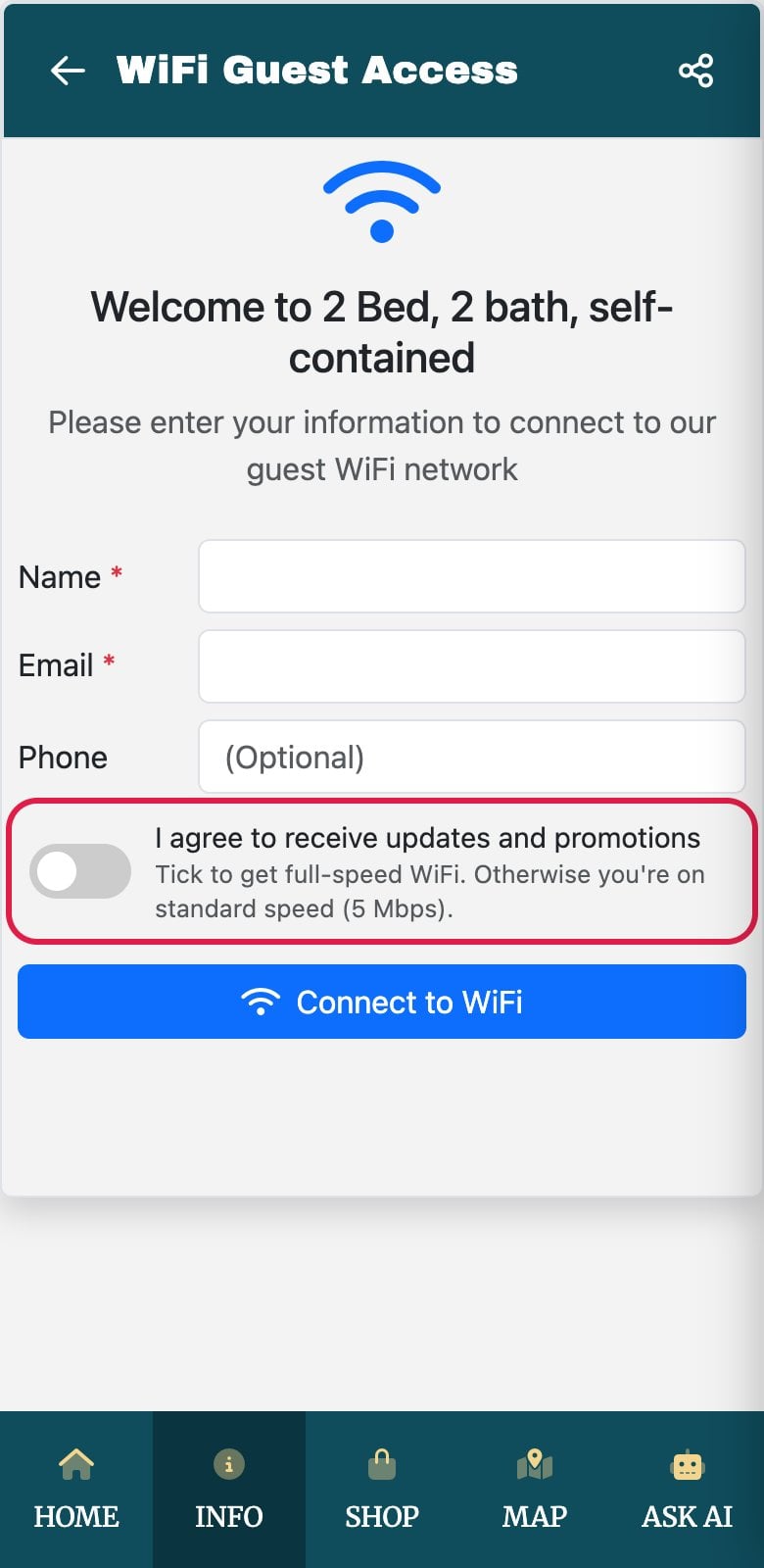
Built-in captive portal captures emails from all guests, not just the booker. Guests enter their details on your Guidebook page to access WiFi. They've got access to your property rules, how-to's and checkout details right at their fingertips, literally.

Collect emails from every guest, not just the primary booker
Automatic opt-in for marketing (GDPR compliant)
Build your direct booking list on autopilot

Protect Your Property from Parties

Monitor device counts in real-time. Get instant alerts when connected devices exceed your booking occupancy - know immediately if there's unauthorized activity.

Real-time occupancy monitoring
Instant alerts for suspicious activity
Set custom thresholds per property

Complete Remote Management

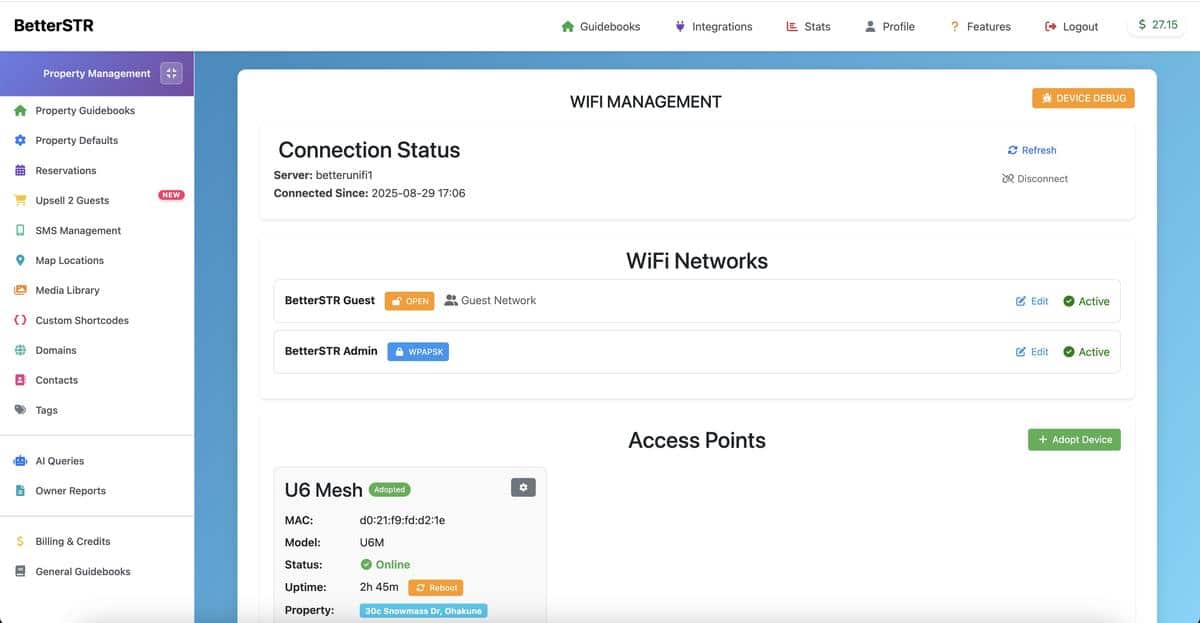
Change passwords, reboot routers, adjust settings - all from your phone. See who's connected, authorize or revoke access instantly. No more property visits for WiFi issues.

Change WiFi passwords remotely
Reboot devices from anywhere
Manage multiple properties from one dashboard

Smart Monitoring & Insights

Get WiFi outage alerts, monitor connection speeds, see device types and usage patterns. Help guests troubleshoot with actual visibility into what's happening.

WiFi uptime and speed monitoring
Device identification and tracking
Bandwidth usage analytics

Works With Leading WiFi Systems

Compatible with the routers you already trust

UniFi by Ubiquiti

UniFi by Ubiquiti

Omada by TP-Link

Omada by TP-Link

Recommended Access Points

TP-Link Omada access points tested and confirmed to work with BetterSTR WiFi

TP-Link EAP225 AC1350
EAP225 / AC1350

Entry-level indoor AP

~1,000 sqft ~93 sqm
  • Dual-band WiFi 5
  • 1350 Mbps
  • Budget-friendly
View on Amazon
TP-Link EAP225 Outdoor AC1200
EAP225 Outdoor / AC1200

Weatherproof outdoor AP

~1,000 sqft ~93 sqm
  • IP65 weatherproof
  • 1200 Mbps
  • Patios & pools
View on Amazon
Most Popular
TP-Link EAP610 AX1800
EAP610 / AX1800

WiFi 6 mid-range AP

~1,500 sqft ~139 sqm
  • WiFi 6 (802.11ax)
  • 1800 Mbps
  • Ultra-slim design
View on Amazon
TP-Link EAP670 AX3000
EAP670 / AX3000

High-performance AP

~2,000 sqft ~186 sqm
  • WiFi 6 (802.11ax)
  • 3000 Mbps
  • 2.5G Ethernet
View on Amazon
Large Properties (~4,000 sqft / ~372 sqm)

For larger vacation rentals, we recommend using 2-3 EAP610 or EAP670 devices for optimal coverage. Alternatively, consider the high-density EAP660 HD / AX3600 for maximum performance.

View EAP660 HD on Amazon

As an Amazon Associate, we earn from qualifying purchases.

See It In Action

Watch how BetterSTR WiFi transforms your property management

Click to load video

See how easy it is to manage your vacation rental WiFi remotely

Simple Setup, Powerful Results

Get started in minutes with your existing router or our pre-configured devices

1

Connect Your Router

Works with UniFi, Omada, and most modern routers. Or get our pre-configured device.

2

Link to a Property

And that's it, your guests are directed to your Guidebook!

3

Start Growing Your List

Every guest who connects adds their email to your marketing database automatically.

WiFi Captive Portal Dashboard

Complete Control Over Guest Information

Customize exactly what information you collect from your guests

Flexible Field Requirements

You decide what information guests must provide to access your WiFi. Every field can be configured as required or optional, giving you complete control over your guest data collection.

Available Fields
  • Guest Name
  • Email Address
  • Phone Number
  • Marketing Consent
Configuration Options
  • Set any field as required or optional
  • Show/hide phone field entirely
  • Make marketing consent mandatory for WiFi access
  • Override settings per property
Property-Specific Settings: Set default requirements for all properties, then customize individual properties with different requirements. Perfect for properties with different guest demographics or marketing strategies.

Whether you want to keep it simple with just an email, or collect comprehensive guest information for marketing - the choice is yours. Configure once and let your WiFi work as your 24/7 marketing assistant.

Built-in Email Validation & Verification

Ensure you're collecting real, verified email addresses from your guests

Domain Validation (Always On)

Enabled by Default

Every email address is automatically validated to ensure it uses a legitimate domain. Guests cannot access WiFi by entering fake emails like "test@fake" or invalid domains.

  • Verifies domain DNS records exist
  • Blocks disposable email services
  • Prevents typos and fake addresses
  • No configuration required

Email Verification (Optional)

Enable in Settings

For maximum validation, enable email verification to ensure guests have access to the inbox they provide. Perfect for building high-quality marketing lists.

5-Minute Verification Window

Guests receive immediate WiFi access, but must verify their email within 5 minutes or they'll be disconnected.

  • Verification link sent instantly
  • Guest gets immediate WiFi access
  • Auto-disconnect if not verified in 5 min
  • Guarantees deliverable email addresses

Result: Build a clean, verified email list of real guests — perfect for direct booking campaigns and repeat guest marketing.

COMING SOON

Turn Your WiFi Into a Revenue Stream

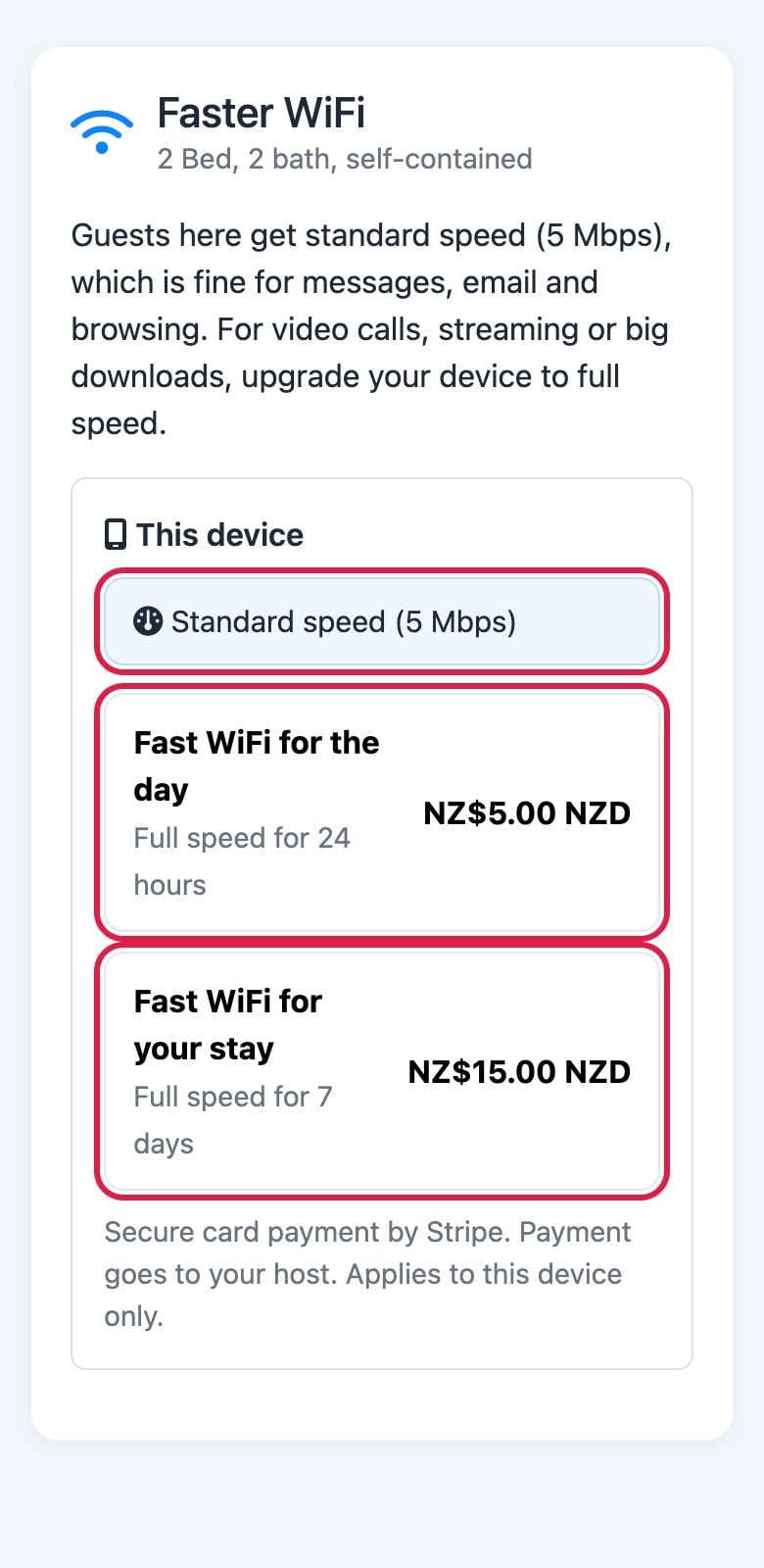
Offer tiered WiFi speeds with premium upgrades

Free & Premium WiFi Tiers

Soon you'll be able to offer guests a choice: complimentary WiFi at standard speeds, or upgrade to premium unlimited speeds for enhanced streaming and work needs.

Standard WiFi (Free)
  • ✓ 10 Mbps speed (configurable)
  • ✓ Perfect for browsing and email
  • ✓ Included with stay
Premium WiFi (Paid Upgrade)
  • ✓ Unlimited speed
  • ✓ HD/4K streaming capable
  • ✓ Ideal for remote work
  • ✓ Priority bandwidth

New Revenue Opportunity

Generate additional income by offering premium WiFi speeds to guests who need faster connections for work or entertainment.

Example Revenue Potential:

10 properties

30% upgrade rate

+$300-500/month

Seamlessly Integrated with Our Upsell System

This feature will work perfectly with our existing digital upsell platform, allowing guests to upgrade their WiFi along with other amenities.

This feature is currently in development and will be available soon to all WiFi management subscribers at no additional cost.

Why BetterSTR WiFi?

One integrated solution vs. multiple services and complex setups

VS

Traditional Setup

  • Separate WiFi marketing service
  • Complex router configurations
  • Multiple monthly subscriptions
  • No party prevention features
  • Limited remote management
  • Separate guest data systems
BETTERSTR

Our All-in-One Solution

  • Built into your Guidebook
  • 5-minute setup process
  • One affordable subscription
  • Smart party prevention
  • Complete remote control
  • Integrated guest database

Simple, Transparent Pricing

Pay only for what you use. Scale as you grow.

INCLUDED IN SIMPLE Up to 3 access points per property are included on BetterSTR Simple, $15 a property a month with the premium guide, Ask AI, a Companion tablet, your TVs and a free domain.

Complete WiFi Management Suite

$2 per access point/month

Plus one-time $5/month controller fee (per account) • Unlimited properties • Unlimited guests

All features included

Calculate Your Monthly Cost

Your Monthly Price

$15

/month

$5 controller fee + $2 × 5 properties

Email capture portal

Party prevention alerts

Remote management

Device monitoring

Marketing automation

24/7 support

Start 14-Day Free Trial

No credit card required

Frequently Asked Questions

We support UniFi, TP-Link Omada, and most modern routers with captive portal capabilities. Not sure if yours is compatible? Our team will help you check during setup.

Set your maximum occupancy, and we'll alert you instantly if the number of connected devices exceeds your threshold. For example, if you have 6 guests booked but see 20 devices connected, you'll know immediately.

Yes! Guests explicitly opt-in when they enter their email to access WiFi. All data is stored securely and you maintain full control over your guest database.

Absolutely! Manage unlimited properties from a single dashboard. Each property can have its own WiFi networks, settings, and monitoring thresholds.

They select the guest network and that's it. It has no password, so anything that connects is automatically redirected to your splash page, where they enter their name and email. You can also generate a QR code for the portal, and BetterSTR TV puts a scannable Wi-Fi QR straight on the television. The splash page is your guidebook, so guests can read the whole guide, house rules, check-out time and local tips, before they're even connected to the internet. You choose which fields you collect and which are required in the guest form settings.

No limits, monthly or overall. And you capture every guest who joins the Wi-Fi, not just the person who made the booking, which is the whole point: the booker is one name on a reservation for six people.

No. Access is granted for 5 days by default, and you can set that shorter or longer in the portal. A one-week stay signs in once.

You run two networks, not one. The open guest network carries the captive portal; a second standard password-protected network bypasses it entirely. That second network is what you, your cleaners and your maintenance people use, and it's where devices that hate captive portals belong (printers, baby monitors, robot vacuums), because captive portals deliberately isolate guest devices from each other. It's also your fallback: hand a struggling guest that password and they're online in ten seconds.

A 2,000–2,600 sq ft home with outdoor areas usually wants a couple of APs, but construction and placement matter more than square footage, so anyone quoting a number sight-unseen is guessing. Where you can, hardwire APs back to the router: a meshed AP spends half its radio time talking to the other AP instead of your guests, so you lose capacity and quality. Plug each new AP into the router by cable first so it can provision itself, then unplug it if it's going to mesh. Existing extenders may well work, but they're not devices we support or can see, so you lose troubleshooting visibility (guest speed, status, remote reboot) for anything behind them. Sizing help: Omada AP options by house size.

The same thing that happens to any Wi-Fi gear: power returns, internet returns, the APs come back up and the portal works. No manual intervention. The portal is also where you troubleshoot without driving over — which AP a guest is on, their connection quality and speed, bandwidth used, device uptime, and a remote reboot button.

No. We collect the data and present it to you live, with CSV export so you can take it into Mailchimp, Klaviyo or whatever you already run. There's no campaign builder here — we'd rather do one job properly than a second one badly. SMS remarketing to past guests is built in, up to ten years back, at $0.10 per message: Remarket to past guests.

No. Your ISP router keeps doing its job, handing out internet, and the access points sit behind it doing the guest Wi-Fi, so the brand on the wall doesn't matter. Buying new gear? We suggest TP-Link Omada EAPs: the most affordable and the easiest to provision (plug in, enter the device key in our portal). See Connecting Omada Wi-Fi to your property. UniFi is fully supported too, if that's what you already own.

Ready to Transform Your WiFi?

Join hundreds of property managers who've turned their WiFi
into a powerful business tool

Start Free Trial Schedule Demo

WiFi Setup Guides

Detailed articles to help you set up and configure WiFi management

Explore More