Your Airbnb listing syncs into BetterSTR automatically, but not every guest books through Airbnb. Direct bookings from your own website, Vrbo or Booking.com stays you manage by hand, phone bookings and repeat guests never reach us, so those guests miss out on their personal guidebook and your TV can’t greet them by name. You can fix that by adding those reservations to the same property yourself. One guidebook and one TV then serve every guest, wherever they booked.
This works for an Airbnb-only account and for any property synced from a PMS. All you need is Premium Guidebook on that property.
What you need
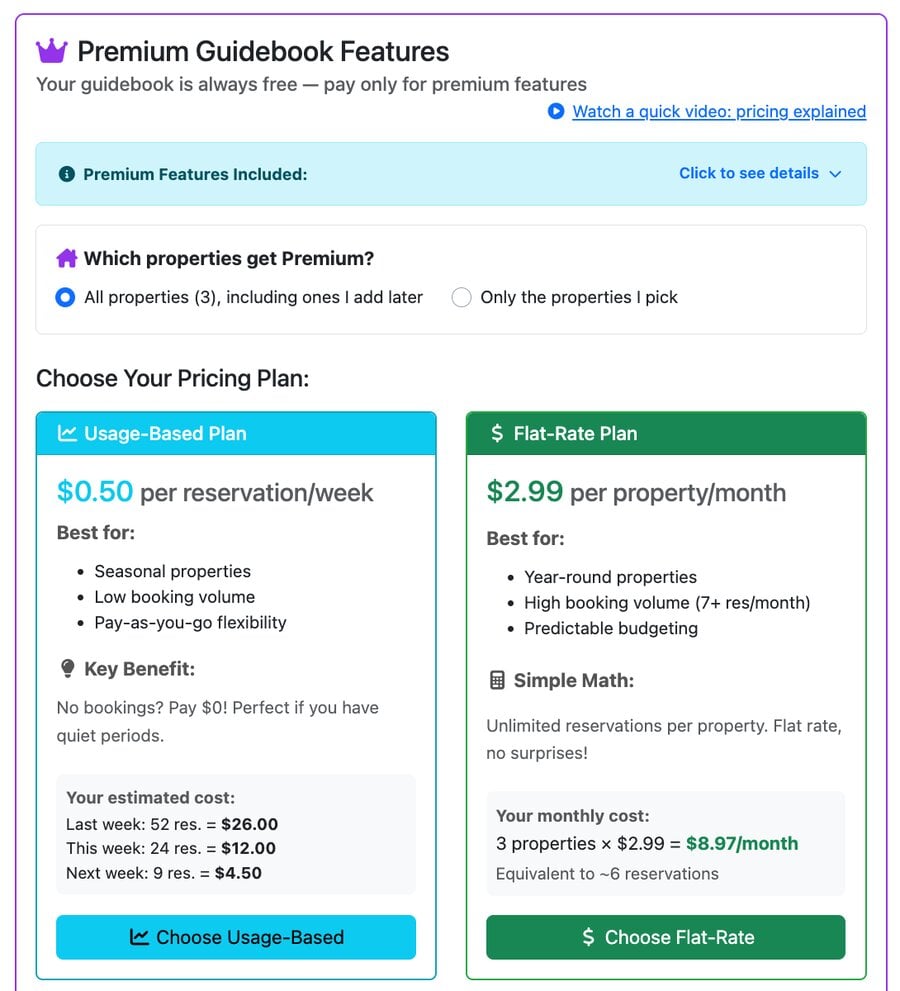
Hand-added reservations on a synced property need that property on a paid plan. Premium Guidebook has two options, and you can switch between them later:
- Usage-based: $0.50 per reservation per week. Best if you only take a few bookings outside Airbnb, or have quiet seasons. No bookings that week, nothing to pay.
- Flat-rate: $2.99 per property per month. Unlimited reservations on that property, from Airbnb and anywhere else. Best for busy, year-round listings.
Properties on BetterSTR Simple already qualify, so there is nothing extra to buy.
Step 1: Turn on Premium Guidebook
- Open Subscription → Add-ons in your dashboard.
- In the Premium Guidebook Features card, choose which properties get Premium: all of them, or Only the properties I pick if you just want it on the listing that takes outside bookings.
- Click Choose Usage-Based or Choose Flat-Rate. You need at least $5 credit or a card on file.
Step 2: Add the reservation
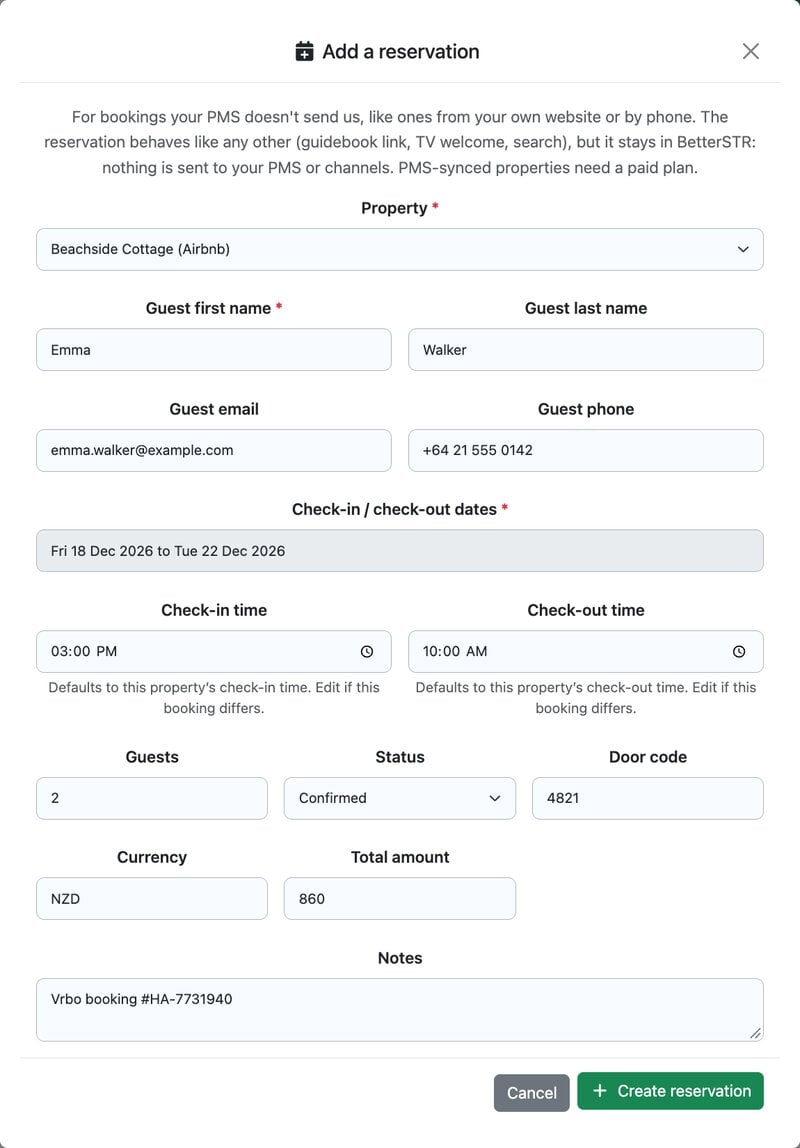
- Go to Reservations and click the blue Add reservation button at the top right (the link opens the form for you).
- Pick your Airbnb listing under Property. Once Premium covers it, it appears in the list alongside any properties you added by hand.
- Enter the Guest first name and the Check-in / check-out dates. Those are the only required fields.
- Add the guest’s email and phone so they can receive their guide, plus the number of guests, a door code, the total amount and any notes (the Vrbo or website booking number is handy here).
- Check-in and check-out times default to the property’s times. Change them only if this booking differs.
- Leave Status as Confirmed and click Create reservation.
What your guest gets
A hand-added reservation behaves like one from Airbnb:
- The guest gets their own personalised guidebook with their name, dates and door code. Click the eye icon on the reservation to see it as they will.
- Your guest automations (guide link by SMS or email, check-out reminders) run for it, and you can send the guide by SMS from the reservation row at any time.
- A linked BetterSTR TV shows the welcome screen with the guest’s name during their stay.
- It appears in your reservation list, calendar and search like every other booking.
To change dates, contact details or the door code later, open the reservation’s details and edit it there. To cancel it, set the status to Cancelled.
Block the dates on Airbnb yourself
Nothing you add here is sent back to Airbnb, your PMS or any other channel. Your Airbnb bookings stay exactly as they are and can’t be edited from BetterSTR. So when you take a Vrbo or direct booking, still block those dates on your Airbnb calendar (or let your channel manager do it) to avoid a double booking.
As a safety net, BetterSTR won’t let a hand-added booking overlap an existing booking on the same property. Same-day turnovers (one guest leaves in the morning, the next arrives that afternoon) are fine.
No PMS or Airbnb connection at all?
If the property isn’t on Airbnb or a PMS, add it by hand first and then add its reservations the same way. See Add a Property Manually (No PMS). For Premium features on hand-added properties, choose the flat-rate plan.