If you use Lodgify or Channex, BetterSTR can get each guest’s personal guidebook link into the booking for you automatically. This article explains the two delivery options (a private booking note or a message straight to the guest), how to choose one for your whole account, and how to change it for individual properties.
Why this setting exists
With many PMSs, BetterSTR fills in a custom field or shortcode that you then add to your own automated messages. Lodgify and Channex don’t offer a custom field or shortcode we can fill in, so your PMS’s own message templates can’t pull in the guidebook link. Instead, BetterSTR writes the link into the booking itself, using one of these methods:
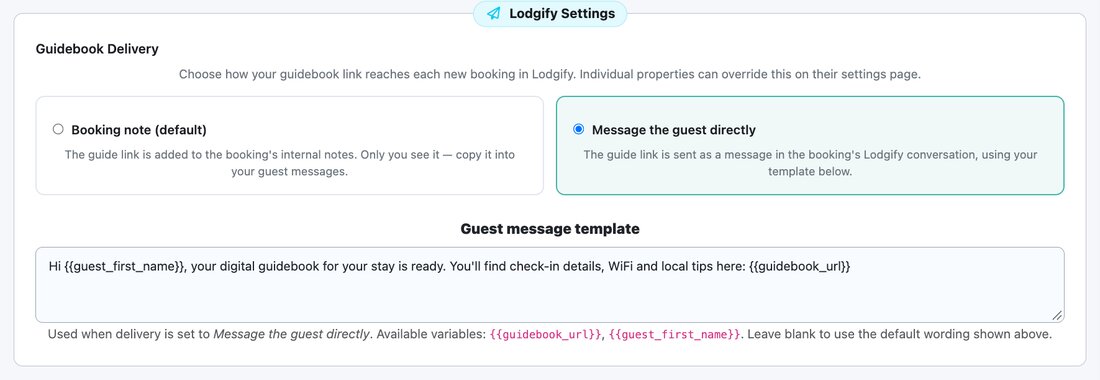
- Booking note (Lodgify only): the link is added to the booking’s internal notes. Only you can see it. Your guest never receives it unless you copy it into a message yourself.
- Message the guest directly: the link is sent to the guest as a message in the booking’s conversation, using wording you control. This is the hands-off option.
Step 1: Choose your account default
- In BetterSTR, open Guidebooks → Property Defaults.
- Click Lodgify (or Channex) in the On this page menu to jump to its settings card.
- Under Guidebook Delivery, choose Message the guest directly.
- Optionally edit the Guest message template (see below), then click Save Defaults.
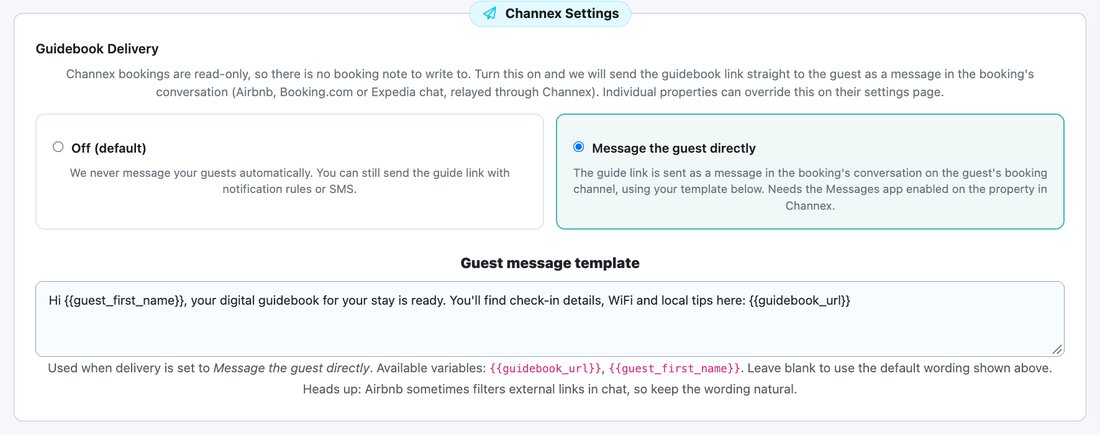
For Channex the card looks slightly different. Channex bookings are read-only, so there is no booking note option: delivery is either Off (the default) or Message the guest directly.
Step 2: Write your guest message
The Guest message template is the text your guest receives. Two variables are filled in for each booking:
{{guidebook_url}}: the guest’s personal guidebook link (always include this){{guest_first_name}}: the guest’s first name
Leave the box empty to use our default wording:
Hi {{guest_first_name}}, your digital guidebook for your stay is ready. You'll find check-in details, WiFi and local tips here: {{guidebook_url}}There is one template per account. It is used by every property that is set to Message the guest directly.
Step 3 (optional): Override it for a single property
If one property needs a different method from your default, for example you want to keep using notes on a property you message guests about manually:
- Open Guidebooks → Properties and edit the property.
- Scroll to Lodgify Settings (or Channex Settings).
- Change Guidebook Delivery from Use default to the method you want for this property, then save.

The property page only chooses the method. The message wording always comes from the template on the Property Defaults page. If you need different wording for different properties, use an automation rule instead (see below).
When is the link sent?
- Once per booking, shortly after the booking syncs to BetterSTR as confirmed. For a booking made months ahead, that means the guest gets the link at booking time, not just before arrival.
- Cancelled bookings, and bookings whose arrival date is more than three days in the past, are skipped.
- Each booking gets this message once, ever. It is never sent again for the same booking, even if you reset guide links, change your custom domain, or disconnect and reconnect your PMS.
- Changing the setting affects bookings that haven’t been processed yet.
- If guidebook links are switched off for a property, nothing is sent for it.
Want to remind guests closer to check-in?
This setting sends once, at booking time, which can be months before the stay. To remind guests nearer arrival, for example 10 days, 4 days or 4 hours before check-in, add an automation rule with the PMS guest message channel. See Send the Guidebook Link at a Set Time Before Check-in.
The two work together: guests get the link when they book, then again at the times you choose. If you only want the scheduled messages, set this to Booking note (Lodgify) or Off (Channex).
Troubleshooting
- Guests aren’t getting the link (Lodgify): check the delivery isn’t still set to Booking note, which is the default for Lodgify accounts. With a note, only you can see the link.
- Guests aren’t getting the link (Channex): delivery is Off by default. Also check the Messages app is enabled on the property in Channex, and that the booking came from Airbnb, Booking.com or Expedia. Direct bookings have no chat thread to send into.
- A link in Airbnb chat looks blocked: Airbnb sometimes filters external links. Keep your wording natural and avoid link-only messages.
- One property behaves differently: open that property’s settings and check whether Guidebook Delivery is overridden.