Guest Verification allows you to collect verified guest information before check-in. This feature helps protect your property, meet HOA requirements, and ensure you have valid contact details for your guests.
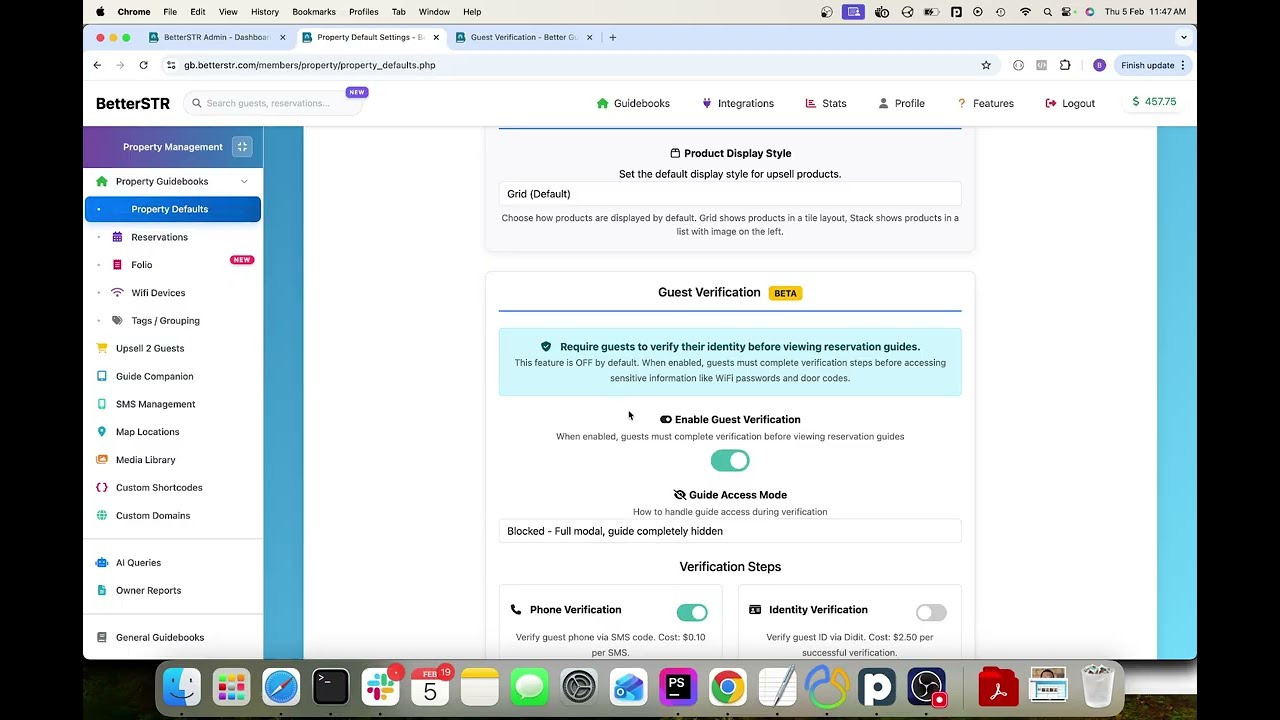
Four Verification Types
You can enable any combination of these verification methods:
1. Phone Verification ($0.10/verification)
Guests enter their phone number and receive an SMS verification code. This confirms they have access to a real phone number you can reach them at.
- SMS code verification
- International numbers supported
- Stored for your records
2. Identity Verification ($2.50/verification)
Guests upload their government ID and take a selfie. AI compares the photos and extracts ID details. Powered by Didit identity verification.
- ID document scan (passport, driver's license, etc.)
- Live selfie matching
- Age estimation
- Name and date of birth extraction
3. Terms Acceptance (Free)
Require guests to read and accept your house rules, rental agreement, or custom terms before accessing the full guidebook.
- Custom terms text
- Digital signature capture
- Timestamped acceptance record
4. Security Deposit (Free - Stripe fees apply)
Pre-authorize a security deposit on the guest's card. No charge unless you need to claim for damages. Requires Stripe Connect.
- Card pre-authorization (not charged)
- Customizable amount and currency
- 7-day hold period
- Capture all or partial amount if needed
Enabling Guest Verification
You can control verification at four levels:
Per Reservation
Enable verification for specific reservations when you get a gut feeling something might be off. From the reservation view, click "Enable Verification" and select which verification types to require.
Per Property
Enable verification for all reservations at a specific property. Go to Properties > Edit Property > Guest Verification and configure your settings.
All Properties (Default Settings)
Set default verification requirements that apply to all your properties. Go to Properties > Property Defaults > Guest Verification.
By Booking Platform
The Booking Platform Filter decides which channels your verification applies to. Choose Selected platforms only and tick the channels you want checked — Airbnb, Booking.com, Vrbo, Expedia, Agoda, Tripadvisor, Google, Direct, Manual, iCal sync or Unknown. Guests from every other channel skip verification entirely.
For example: enable only the security deposit on a property, filter it to Booking.com, and just those guests get a card hold while your Airbnb and Vrbo guests go straight into the guidebook. The filter applies your whole verification setup to the channels you pick, so it is “these checks, for these channels” rather than a different check per channel. It is available in both Property Defaults and per property.
See Booking Platform Filter - Require Verification Only From Certain OTAs for setup steps and examples.
How It Works for Guests
- Guest receives your guidebook link (via email, SMS, or Airbnb message)
- When they open the guidebook, a verification modal appears
- Guest completes the required verification steps
- Once verified, they gain full access to the guidebook
- You can view their verification details in the reservation view
Viewing Verification Results
From your reservations list, verified guests show a green checkmark. Click on a reservation to view:
- Verified phone number
- ID document images and extracted details
- Terms acceptance timestamp
- Security deposit status
- IP address and location analysis
Requirements
- Phone Verification: Requires account balance ($0.10 per verification)
- Identity Verification: Requires account balance ($2.50 per verification)
- Terms Acceptance: No requirements (free)
- Security Deposit: Requires Stripe Connect account
Add funds to your account at Account > Billing > Add Funds.
Best Practices
- HOA Properties: Enable ID verification and terms acceptance to document guest registration
- Luxury Properties: Enable security deposits for high-value rentals
- Last-Minute Bookings: Enable phone verification at minimum for same-day reservations
- Party Prevention: ID verification acts as a deterrent for problematic guests
Related Features
- Review Request Notifications - Automatically request Google reviews from guests who leave positive feedback
- Booking Platform Filter - Require verification only from certain booking channels, e.g. deposits from Booking.com guests only
- Guest Verification Overview - Features, pricing and use cases for phone, ID, terms and deposit checks
- Airbnb Guest Screening: How Guest Screening Technology Works - What Airbnb actually verifies, where the gaps are, and when to use each check
- Digital Guidebook Features - Explore all guidebook features