Airbnb has rewritten how house rules work. Hosts now pick from seven standard rules (guest numbers, quiet hours, events, pets, smoking, commercial filming and lock-up at checkout), and anything else goes in as a “request” that has to be reasonable. Alongside that, a new Reasonable House Rules and requests policy applies to every reservation booked on or after 20 November 2026. Airbnb's own summary is in Important changes to house rules.
Most of the coverage has been about dishes and laundry: you can ask guests to put dishes in the sink, but not to wash them, and you can ask them to pile up towels, but not to strip the bed. The parts that matter more to the tools hosts run are a few lines further down. Under the new policy, hosts generally may not:
- Ask for government ID or other personal information, “except where required by law and in other limited circumstances”.
- Ask guests to sign separate contracts, apart from a short list of exceptions.
- Restrict access to any feature that's advertised as part of the listing.
- Charge hidden fees: anything mandatory must be in the price the guest sees before booking.
- Add new rules anywhere other than the listing's House rules and requests section, including in messages, on signs or in person after booking.
Airbnb can respond with warnings, a notice on your listing (“includes cleaning requests” is the example it gives), lower search placement or further action under its Terms of Service. So this is worth getting right before your November bookings start arriving.
1. WiFi captive portals We see no issue
A captive portal is the page that appears when a guest first joins the WiFi, asking them to accept the terms of use before they get online. It is the same thing you see at hotels, airports, cafés and libraries, and it is standard network infrastructure rather than a house rule. We don't see the new policy changing that.
Why a portal protects you, and your guests
Free WiFi is still a service, and the person or business that owns the connection is the one answerable for what happens on it. The portal is where the guest agrees to the basics: no illegal activity, no attacks on other systems, no misuse of the network. It also leaves a record of which device was connected, when, and under which booking. That record matters more than most hosts realise:
- Copyright notices, and your internet being cut off. When a guest torrents a film or TV show, the infringement notice goes to the account holder, which is you. Depending on your provider's terms, repeated notices can lead to your connection being restricted or suspended, which takes the WiFi away from every guest who comes after. Being able to show who was connected at that time, and that they agreed not to do it, is often what settles it.
- Hacking, fraud and system abuse. If your connection is used to break into an account, run a scam or attack a website, your IP address is the one in the logs. A dated record tied to a guest and their acceptance of the terms is your defence.
- The serious end. In the rare but real cases where police or national security agencies investigate a connection used in something far worse, a clear record of who was on your network is what separates you, the property owner, from the person they are actually looking for.
We have been through this ourselves. A guest at one of our own properties downloaded copyrighted content, and the notice came to us as the account holder. What helped was being able to tell our provider exactly who was connected, when, and under which booking. A record like that doesn't prove who did something, but it gives you something solid to answer the complaint with, and it points any investigation at the right person instead of you.
None of that stops a guest using the internet. It is a one-tap acceptance, and the WiFi stays exactly as advertised.
Apartments and buildings with shared internet
Plenty of apartment complexes, serviced apartments and managed buildings don't let owners buy their own internet connection at all. The building provides one shared connection for every unit, and it often sits behind a captive portal run by building management or the body corporate, exactly like the one at a hotel. If your listing is in a building like that, the portal isn't something you added and it isn't something you can switch off. It is simply how internet works in that building, for owners, tenants and guests alike. We can't see Airbnb expecting a body corporate to rewrite its network rules for one short-term rental, and we read the policy as aimed at rules a host chooses to impose, not at the way a building's shared services are run. If this is your situation, say so in your listing's Requests so guests know what to expect when they connect.
The one setting we would change: marketing consent
Our portal lets you choose whether ticking the marketing box is optional or a condition of getting online. Under the new policy, we recommend leaving marketing turned on but optional on any property that takes Airbnb bookings. Making a guest join your mailing list before they can use WiFi that is listed as an amenity looks very much like “restricting access to an advertised feature”, and it is the one part of the portal we think could be read as a breach.
Making marketing optional doesn't mean giving up the connection record. The portal can still ask for the guest's name, email or phone number as part of joining the network, because that is about security and accountability. The difference is that a guest no longer has to agree to receive marketing to get online. Keep what you ask for to what you genuinely need, explain why on the page, and handle it in line with your local privacy law.
Guests who want to hear about your direct-booking offers will still tick the box, every choice is still recorded with their details, and you keep a list of people who actually want to hear from you, which is a better list anyway.
Update, 26 October: you can now give guests a reason to tick it. With guest WiFi speed upgrades, every guest gets online at a standard speed, and guests who opt in get full-speed WiFi. You can also sell fast-WiFi passes, paid into your own Stripe account. Marketing stays optional, so it fits the new policy, and your list still grows.
To change it: in BetterSTR, open Wifi Devices → Settings and, under Marketing Settings, switch off Require Marketing Agreement, then click Save Settings. If you've set it per property, click the cog next to that property's access point on your controller page and switch it off there too. The marketing box stays on your sign-in page; guests just don't have to tick it to get online.
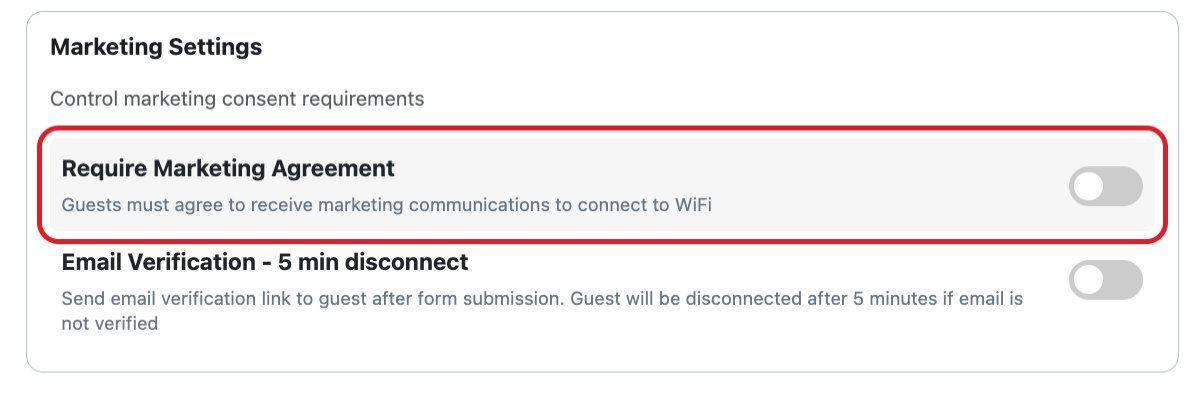
Switch off Require Marketing Agreement for properties that take Airbnb bookings.
It is also worth one line in your listing's Requests, along the lines of “Guest WiFi opens with a short terms-of-use page”, so nothing about the WiFi comes as a surprise after booking.
2. Damage and security deposits Compliant when set up through your PMS
Airbnb's pricing and payment transparency rules haven't changed with this update. Most hosts can't charge a security deposit or card hold, but select software-connected hosts can collect one off-platform, on the condition that it is entered in the right fee field so the guest sees it before they book.
In practice, that means: if your property management system is connected to Airbnb and the security deposit is set up there, so it shows on the listing before booking, then a BetterSTR deposit hold collects exactly what the guest agreed to. It isn't a new rule and it isn't a hidden fee, and we see BetterSTR as fully compliant here.
Airbnb attaches a few conditions to deposits, and BetterSTR is built around them:
- Release it within 7 days of checkout if there is no damage. BetterSTR deposits are a pre-authorisation, not a charge, and release automatically if you don't claim. Make any claim inside that window.
- Keep evidence. If you keep any part of a deposit, Airbnb expects you to give the guest a written explanation and evidence of the damage. Photos, the guest's accepted terms and their verification record all sit on the booking in BetterSTR.
- Disclose it before booking. If the deposit isn't showing on your Airbnb listing, fix that in your PMS first. A deposit the guest never saw before booking is exactly what the policy targets.
If your Airbnb connection can't show a deposit, use the Booking Platform Filter to apply deposits to your other channels only (Booking.com, Vrbo, direct and so on) and leave your Airbnb bookings to AirCover.
3. Guest ID verification The one real risk
This is the part of the policy we think could catch out hosts using BetterSTR, and we would rather say so plainly. Airbnb's limited circumstances page says hosts may only collect personal information or registration on a separate site or app where it is needed to:
- comply with the law or a documented community association rule (an HOA or building security requirement, for example), or
- facilitate signing one of the contracts Airbnb still allows.
Hosts may still check a guest's ID in person at check-in if that is disclosed in the listing's requests, but they may not keep a copy outside those exceptions.
If you are in one of those exceptions, you are fine. Many countries, including Italy, Spain and Portugal, require hosts to register every guest's identity document with the authorities, and BetterSTR's ID check is a straightforward way to do that before arrival. The same goes for buildings that require guest registration. Outside those cases, a mandatory pre-arrival ID check on an Airbnb booking may be read as a breach of the new policy, and only Airbnb gets to make that call.
What we are doing on our own properties
We are keeping ID verification switched on for our own properties. Deposits and ID checks are a stated part of how we take bookings, and we say so on the listing, in the booking confirmation and in every message that follows. We are doing that with our eyes open, because for us the two go together.
A damage deposit is only as good as your ability to defend it. When a guest disputes a deposit with their bank, the bank wants proof that the cardholder authorised it. Airbnb handles disputes over the booking itself, but a deposit hold collected through your PMS sits on your payment account, so that chargeback is yours to fight. With BetterSTR, we can show the bank that the guest accepted the terms, entered the card themselves, and proved with a live ID check that they are the person named on it. Without the ID step, it is the guest's word against ours.
Why a photo of an ID isn't proof any more
For years, the usual check was a photo of the guest holding their ID, or their credit card. AI image tools now make that photo easy to fake in seconds: a convincing licence, a matching face, a believable kitchen in the background. A photo shows you that someone can make a photo.
BetterSTR's identity verification checks the document itself and then takes a live selfie, with liveness detection, to confirm a real person is in front of the camera and matches the ID. That is the difference between collecting a picture and verifying a person.
Why hosts want their own checks
Plenty of hosts feel that Airbnb's dispute process leans towards guests, and many no longer rely on it to protect their homes. Airbnb does verify guests, and that has value. But Airbnb earns money on every booking that goes ahead, so its incentive will always be fewer hurdles for guests, not more. It is fair for an owner to want to know exactly who is staying in their home, using checks that keep up with how fraud now works rather than waiting for a platform to catch up.
How you balance that is your decision, and it may differ property by property. What we would suggest:
- If the law or your building requires guest ID, keep verification on and note the requirement in your listing's requests.
- If you want verification on Airbnb bookings anyway, as we do, put the requirement in the House rules and requests section so it is disclosed before booking, and understand that Airbnb may disagree.
- If you would rather not take the risk, use the Booking Platform Filter to keep ID verification on Booking.com, Vrbo and direct bookings and switch it off for Airbnb, in one setting. Our earlier post on how to verify Airbnb guest ID covers what Airbnb already checks.
A checklist before 20 November
- Move every rule into the listing. The policy says rules can't be added by message, sign or in person after booking. Messages and confirmations can remind guests of what the listing already says, but they can't add anything new. This applies to deposits and ID checks as much as to quiet hours.
- Check your requests in the Listing editor. Airbnb highlights requests it thinks break the policy, and you can edit them or appeal.
- WiFi: make marketing consent optional on properties that take Airbnb bookings.
- Deposits: confirm the deposit shows on your Airbnb listing through your PMS before booking. If it can't, filter deposits to your other channels.
- ID verification: decide property by property whether you are in a legal exception, keeping it on and disclosing it, or filtering Airbnb out.
- Watch for listing notices or emails from Airbnb after 20 November, and adjust if they flag anything.
This post is our reading of Airbnb's published policies as of 23 October 2026. It isn't legal advice, and Airbnb decides how it applies its own policies. If Airbnb clarifies how any of this applies to WiFi portals, deposits or verification, we will update this post.
Common questions
When does Airbnb's new house rules policy start?
It applies to reservations booked on or after 20 November 2026. Bookings made before then stay under the old rules.
Can Airbnb hosts still ask guests for ID?
Only where the law or a documented building or community association rule requires it, or to facilitate a contract Airbnb allows. Hosts can also check ID in person at check-in if they disclose it in the listing's requests, but can't keep a copy outside those exceptions.
Can I still take a security deposit on Airbnb bookings?
Most hosts can't. Select software-connected hosts can collect one off-platform if it is listed in the right fee field so guests see it before booking, and it must be released within 7 days of checkout if there is no damage.
Is a WiFi captive portal allowed under the new policy?
We think so. Accepting terms of use before using a network is standard practice and doesn't stop a guest using the WiFi. What we would avoid is making marketing sign-up a condition of getting online, because WiFi is an advertised amenity.
Can I switch BetterSTR verification off for Airbnb guests only?
Yes. The Booking Platform Filter, under Properties > Property Defaults > Guest Verification, applies your verification setup only to the channels you choose.