The context matters. This host is finalising everything by the end of September, when they will be at both properties in person, and they do not want either place offline for more than a day. That is exactly the right way to approach it: work out the whole plan first, order the hardware, then do one visit and switch it all on.
If you are at the same stage, this post is the reading list. It covers the digital guidebook, the Wi-Fi captive portal, the Companion tablet and BetterSTR TV, then finishes with the actual numbers.
The short version
- Guidebook edits reach the tablet in 10 to 15 minutes, the TV in 15 to 25, or instantly if you press Home.
- The guest Wi-Fi has no password. Guests are redirected to your guidebook, and a second private network is always there as the fallback.
- Any TV with an HDMI port works, Roku and Samsung and LG included, because our box becomes the source.
- We give you the guest data and let you export it. We do not send email campaigns for you.
- Guidebook free forever. Wi-Fi from $7 a month. TV free, Premium from $2 a device. Tablet from $2.
How quickly do guidebook changes reach the devices?
You edit your guide in the portal. The web guidebook, the one guests open on their phone, updates as soon as the page is loaded again. The in-room devices are on a polling cycle, because a screen that hammers your server every ten seconds is a screen with a flat battery and a saturated Wi-Fi link.
- Companion tablet: refreshes every 10 to 15 minutes.
- BetterSTR TV: every 15 to 25 minutes while the TV is on, and hourly while it is in standby.
- Instant, on demand: pressing Home on the TV forces a fresh pull from our backend, provided it has not already done one in the last 60 seconds.
In practice that means a typo you fix at 9am is on every screen before the first guest reads it, and if you are standing in the room wanting to see a change right now, you press Home.
The Wi-Fi captive portal and email capture
How do guests actually get to the portal?
They select the guest Wi-Fi network and that is it. The network has no password, so there is nothing to type, and anything connecting to it is automatically redirected to your splash page. No app, no printed password card, no phone call at 11pm because the card says lowercase and the network wants uppercase.
You can also generate a QR code for the portal, and BetterSTR TV puts a scannable Wi-Fi QR straight on the television, which is the version guests find first because the TV is usually the first thing they switch on.

What do guests have to give you?
Name, email and phone. You decide which of those you collect and which are required rather than optional, in the guest form settings. There is no cap on how many addresses you collect, monthly or overall.
The important detail: the splash page is your guidebook. Guests can browse the whole guide, house rules, check-out time, local recommendations, before they have connected to the internet at all, because it is served as part of the portal. So the sign-in screen is not a toll gate, it is the welcome.
Do guests have to sign in again every day?
No. Access is granted for 5 days by default, and you can set that shorter or longer per account. A one-week stay signs in once.
What if an access point dies mid-stay?
This is the question we like, because the honest answer is a design decision we made early. You run two networks, not one:
Guest network
Open, no password, runs the captive portal. Every guest who joins gives you a name and an email.
Standard network
Ordinary password, never touches the portal. Yours, your cleaners’, and your fallback when something goes wrong.
That second network is what you, your cleaners and your maintenance people use. It is also where devices that hate captive portals belong, printers, baby monitors, robot vacuums, anything that needs to talk to another device on the same network, because captive portals deliberately isolate guest devices from each other. And it is your fallback: if a guest cannot get the portal to load for any reason, you hand them that password and they are online in ten seconds.
Some hosts keep their old router Wi-Fi running as a third “Backup” network as well. It is never necessary, and most people delete it a few months in to cut down the noise.
How many access points do I need?
The host asking had a 2,000 sq ft home and a 2,600 sq ft home, both with outdoor areas reaching about 100 feet from the house. For that, a couple of APs each, but Wi-Fi is full of unknowns and anyone who quotes you a number without seeing the place is guessing. Construction matters enormously (brick and concrete versus timber), and so does placement: central beats tucked in a corner cupboard, every time.
If you are running more than one AP, hardwire them back to the router where you can. Meshing works, and it is the right answer when running cable is not realistic, but a meshed AP spends half its radio time talking to the other AP instead of to your guests. You lose capacity and quality. Cable where practical, mesh where not.

We have written up the options by house size in Omada Wi-Fi AP options by house size.
My ISP router is a brand you do not list. Is that a problem?
No. Your ISP router keeps doing its job, handing out internet. The access points sit behind it and do the guest Wi-Fi. It does not matter whether the box on the wall is Adtran, Technicolor, Fritz or anything else.
If you are buying new gear, we suggest TP-Link Omada EAPs: the most affordable, and the easiest to provision. Setup is plugging the device in and entering its key into our portal. Connecting Omada Wi-Fi to your property shows exactly how short that process is. UniFi is fully supported too, if that is what you already own.
We get power cuts. What happens afterwards?
The same thing that happens to any Wi-Fi gear. Power returns, the internet returns, the APs come back up and the portal works. No manual intervention, no re-provisioning.
The portal is also where you troubleshoot without driving over: which AP a guest is connected to, their connection quality and speed, how much bandwidth they have used, device uptime, and a remote reboot button.
I already have Wi-Fi extenders. Can I keep them?
You can, and they may well extend the signal fine. But be clear about the trade: they are not devices we support or can see. If a guest has trouble on one, we cannot help you diagnose it, and you lose the portal visibility described above (their speed, their usage, the reboot button) for anything connected through them. Most people replace the extenders with proper APs during the same visit and are glad they did.
Wi-Fi marketing: what it is, and what it is not
This one gets oversold across the industry, so here is the precise answer.
We collect the data and present it to you, live. Every guest who joins your Wi-Fi, not just the person who made the booking, which is the whole point: the booker is one name on a reservation for six people. You get all of them, with the property and date attached.
We do not send email campaigns for you. There is no campaign builder, no newsletter designer. You export to CSV and take that into Mailchimp, Klaviyo, or whatever you already run. We would rather do one job properly than a second one badly.
We do send SMS. Remarketing to past guests by text is built in, up to ten years back, at $0.10 a message, which is how most hosts actually convert an old stay into a direct booking. Details in Remarket to past guests with SMS or CSV export.
If you are comparing us to the usual names in this space, the StayFi comparison covers the differences properly.
The Companion tablet
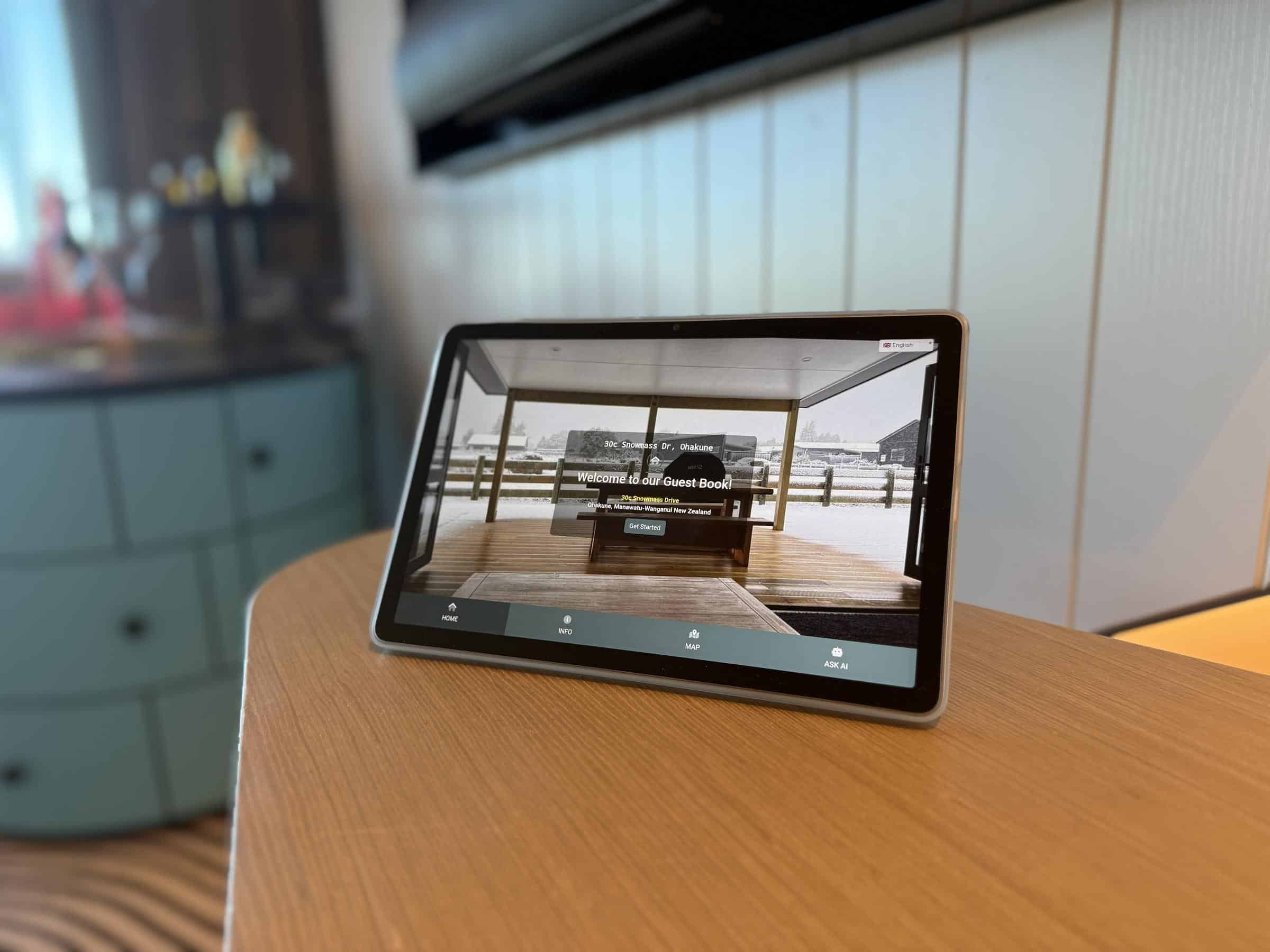
Why are the recommended tablets not five-star products?
Because we linked to the ones we have tested, not the ones with the best reviews. Any Android tablet works. The minimums are 4GB of RAM, a 10 inch screen and Android 11 or newer. Beyond that, buy what you like. Lenovo is a more trusted brand and costs a bit more if you would rather go that way.
On the mediocre reviews: our software is very light. A lot of one-star reviews on budget tablets are from people who bought them for gaming or heavy apps and found them slow. For displaying a guidebook in kiosk mode, the specs are more than enough.
Can I buy a preconfigured tablet from you?
Not currently. We used to sell commercial-grade tablets, Power over Ethernet, built-in stand, genuinely nice hardware. The problem was economics: $100 USD a unit, 100 unit minimum order, and they needed a mains power supply rather than USB, which meant stocking power adaptors for every market we ship to. Meanwhile bring-your-own-device worked perfectly well, and around 99% of hosts either buy a device locally or repurpose an old tablet from a drawer. We may revisit it. For now, BYOD, and there are plenty of wall-mount and desk-mount cases on the market.
BetterSTR TV

Is there a Roku app? I have Roku TVs.
There is no native Roku app, and we are honest about why we are not rushing to build one. Roku does not allow an app to become the launcher, so it could never be what loads when the TV turns on. A guest would have to find and open it themselves, which defeats the purpose.
Your Roku TVs are fine. Plug our box into an HDMI port and it becomes the source the TV starts on. Any television with an HDMI input can run BetterSTR TV, whatever its own operating system is. That includes Roku, Samsung and LG sets, which are not supported as host devices for the app itself.
Does the box arrive configured?
You plug it in, it notices there is no Wi-Fi configured and asks you to pick your network. It then displays a QR code, you scan it, choose which property to link it to, and within about 30 seconds the TV is showing that property’s welcome screen. Full walkthrough in Setting up your Android TV.
What about the remote?
A Bluetooth remote is included, and it replaces the TV remote for day-to-day use. One quirk worth knowing: volume is digital. Set the TV itself to something like 30 or 40, and our box then controls 0 to 100% of that range. Keep the original TV remote in a drawer for the rare occasion someone needs it.
The box has IR functions too, and pairing a replacement remote is holding OK and volume-down together for 10 seconds. Replacements are cheap on Amazon or AliExpress, the same as for any Android TV product.
What warranty is there?
One year. Hosts return the unit to us for investigation. We have only recently started selling our own hardware, and we went with a known OEM rather than a cheap unbranded box, which costs us a little more per unit and saves everybody the pain later.

You do not have to buy from us. If you would rather source your own, look for an Android TV or Google TV device with at least 2GB of RAM, which is the line below which everything feels sluggish. Two we recommend and use:
- Xiaomi TV Stick 4K (Gen 2), the budget pick, USB powered, compact enough to hide behind the TV.
- Google TV Streamer 4K, the best all-rounder, Android 14 with Ethernet as well as Wi-Fi.
Amazon Fire TV, Samsung (Tizen) and LG (webOS) devices are not supported, so avoid those. Best streaming device for Airbnb goes through the options in more detail.
Are guests locked into the BetterSTR interface?
Only if you want them to be. Kiosk mode is a toggle in the portal. With it on, guests cannot install apps or wander into settings. With it off, the TV behaves like a normal TV with your welcome screen as the home.
It is not all-or-nothing either. If a guest rings and asks for the Formula 1 app, you grant short-term access to the Play Store, they install it, and you toggle kiosk back on. That takes about a minute and does not need you to be in the country.
Can guests cast to it?
Apple devices use AirPlay, for screen sharing from a laptop or sending video from YouTube and similar. Android devices use Cast. The caveat that applies to every TV device, not just ours: not every app permits casting, and some deliberately block it.
Does it sync with my PMS?
Yes. The TV shows the current guest’s name and their check-in and check-out details, pulled from your PMS, and resets between stays. That is the same reservation sync the guidebook uses. We support 16 PMS platforms and channel managers with another two in final testing, listed on the integrations page.
Hospitable was our first integration, because it is what we use for our own properties, so it is thoroughly supported. If you are on Hospitable you can connect in one click from their app marketplace, and new signups get premium guidebook and TV features free for 2 weeks.
Activities, commission and reviews
The 4% on activities: where does that come from?
We hold the relationship with Viator, who pay us 8% commission on bookings made through the platform. We share half of that, 4%, with you. There is nothing for you to set up and no relationships to negotiate with activity providers. The guest pays Viator’s normal price, nothing is added on top. It works the same way in your guidebooks as it does on the TV. See adding Viator activities to your guidebook.
Does review routing work with Airbnb and Vrbo?
No, and be sceptical of anyone who says theirs does. Our review flow is for public review sites: Google, Tripadvisor and similar. Good reviews on your Google business profile help your ranking in search, which is worth real money if you take direct bookings.
Airbnb and Vrbo reviews sit inside those platforms and nobody can touch them. Where our flow still helps you there is information. If a guest leaves you 1 to 3 stars in our feedback step, that is a strong signal about what they are going to write on Airbnb. You can then write your review of them to match reality, instead of leaving a glowing review and discovering the surprise afterwards.
Hospitable also has a review delay function, so once you know a bad review is coming you can push yours to the end of the window, which has the side effect of pushing theirs further down your listing if other bookings review you in those 14 days. More on the flow in Review request notifications.
So what does the whole thing cost?
The guidebook is free forever, with unlimited properties and no credit card. Everything below is optional and priced per what you actually turn on. This is the “both properties, everything switched on” answer:
| Product | Price | Notes |
|---|---|---|
| Digital guidebook | Free | Unlimited properties and guests |
| Premium guidebook | $2.99 per property per month, or $0.50 per reservation | Flat rate or usage based, your choice. Competitors typically charge $10 to $15 per month |
| Wi-Fi captive portal | $7 per month for the first property, then $2 per additional property | Unlimited guest email capture |
| BetterSTR TV | $4 per device per month, or $3 with a premium guidebook | Premium free for the first 2 weeks. Prepay tiers: $36 for 12 months, $60 for 24, $72 for 36 ($2 a month) |
| Companion tablet | $2 per device per month, or $5 with noise monitoring | Bring your own tablet |
| TV hardware | $35 USD plus shipping | Optional. 1 year warranty. Or buy your own Android TV device |
| SMS | $0.10 per message | Guidebook delivery and past-guest remarketing |
Full detail on the pricing page, and hardware in the shop.
What actually makes us different
Two things, and neither of them is a feature list.
Pay for what you want. Most of this category sells you a bundle built around one need, at $10 to $15 a month, and then you sign up with a second vendor for the Wi-Fi and a third for the in-room screen. We would rather you turn on the guidebook, decide later whether the Wi-Fi portal is worth $7, and never pay for the TV product if you do not put TVs in your rentals.
Products nobody else has. The in-room TV welcome screen and the Companion tablet are not standard offerings in this market. If you have been looking for them, that is because most of the industry has decided the guidebook is the whole job.
If you are planning a single install day
The sequence that works, for anyone doing what this host is doing:
- Sign up now and build the guidebooks. It is free and it is the part that takes the longest, because it is writing, not wiring.
- Connect your PMS so reservations, dates and guest names flow through.
- Order the access points and TV boxes with enough lead time for shipping.
- On the day: APs in first, cabled to the router to provision, then unplugged if they are meshing. TV boxes next, one QR scan each. Tablets last, they are the quickest.
- Test with your own phone as if you were a guest: join the open network, complete the portal, read the guide, scan the TV’s Wi-Fi QR.
None of that takes a property offline. The guidebook work happens weeks earlier from your desk, and the hardware goes in between check-outs.