Host Port is an Australian property management system and channel manager for short-term rental hosts. It runs Airbnb, Booking.com, Vrbo, Expedia, Agoda and Google bookings (through Channex), iCal links and direct bookings from one place. The connection went live on 2 November 2026, and it's marked Beta while the first hosts use it.
Connect with a data connection
- In Host Port, go to Settings → Data connections and click New connection. You need Host Port's paid plan, and it has to be the account that owns the listings, not a co-host.
- Tick the listings you want in BetterSTR, then tick Bookings and Calendar. You don't need Reviews or Earnings.
- Turn on include guest names and contact details, so the TV and guide can greet guests by name.
- Click Create connection and copy the API key. It starts with
hpk_, and Host Port shows it only once. - In BetterSTR, go to Integrations → Host Port, paste the key and click Connect Host Port. Then click Sync Properties and your listings and bookings come across.
Every booking, on the right property
Each listing in your Host Port connection becomes its own BetterSTR property, with its name and timezone. Every booking comes across with the guest's name, email and phone (when guest details are on and the channel shares them), the dates, guest numbers, the channel, the status and the total. Cancellations come through too.
One catch with Airbnb: when Airbnb reaches Host Port through an iCal link, the booking carries the guest's name but no email or phone. That's how Airbnb's iCal works. The TV and the guide still greet those guests by name, but their guide link has to go out through Airbnb messages.
Add your guide details once
Host Port shares listing names, not the rest of what goes in a guide. Add the address, photos, WiFi, check-in and check-out times, house rules and door codes to each property in BetterSTR once. Syncs never overwrite them, so you won't lose your edits.
Host Port's API is read-only. BetterSTR never changes anything in your Host Port account, which also means it can't save the guide link on the booking or message guests through Host Port. Guides go out by BetterSTR email or SMS, or you send the link yourself.
How quickly bookings arrive
BetterSTR checks Host Port for bookings every 10 minutes and re-reads your listings once a day. New listings show up on their own, and a listing you take out of the connection is removed from BetterSTR too.
Want it faster? Paste our webhook address into the Host Port connection's Webhook settings, then paste the signing secret back into BetterSTR. New and cancelled bookings then arrive within a minute.
BetterSTR TV: the screen in your rental
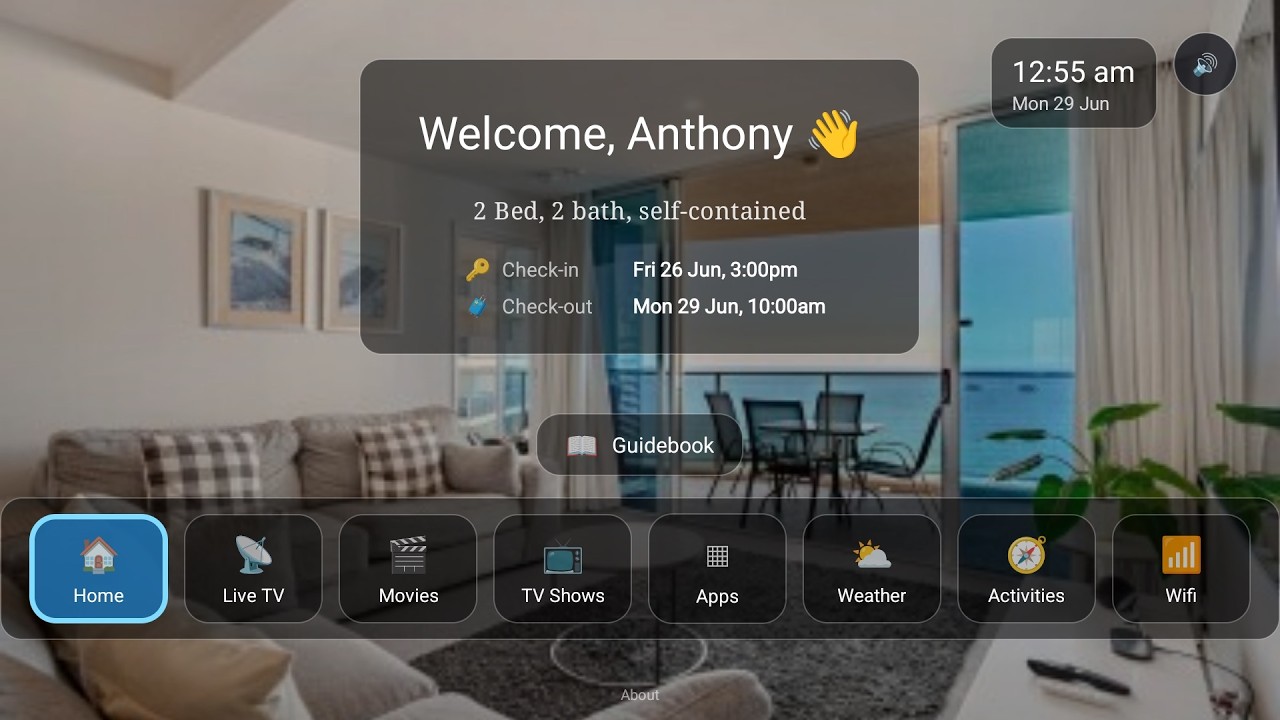
Host Port runs your bookings, and BetterSTR TV puts them on the screen in your rental. It's a guest launcher for Android TV and Google TV, and with Host Port connected, the TV in every property knows who's staying and when:
- Welcome by name: greets each guest by name, keyed to their Host Port booking, and shows their stay dates.
- Guidebook on the big screen: your house information and local recommendations, browsable with the TV remote.
- WiFi QR on screen: guests point their phone at the TV and they're connected.
- Local activities and weather: things to do nearby and the forecast for their stay.
- Casting and streaming apps: guests watch their own content on your TV.
- Upsells: your extras, shown where guests are already looking.
- Clears between stays: the next guest starts fresh.
Watch the Video
Turn your TV into a 5-star guest experience
See the full rundown on the BetterSTR TV page and the digital guidebook page.
What it costs
- No setup fee for the Host Port connection, and it's part of the free plan, like our other PMS integrations. On Host Port's side, data connections need its paid plan.
- The digital guidebook and the TV welcome screen are free, forever.
- Premium guidebook: 50c per reservation, or $2.99 per property a month.
- BetterSTR TV Premium: $4 per TV a month, from $2 a month prepaid over several years.
Full details are on our pricing page.
The step-by-step help article walks through each screen, the Host Port integration page lists exactly what syncs, and you can browse all BetterSTR integrations to see what else connects.