Mews is a cloud property management system for hotels, hostels, serviced apartments and aparthotels. It now connects to BetterSTR, and BetterSTR is a certified Mews Marketplace partner: we passed Mews' Connector API certification on 27 October 2026, and you'll find us in the Marketplace under Guest Technology.
Connect from the Mews Marketplace
There's nothing to request and no one to wait on. A hotel connects itself in about 15 minutes:
- In Mews Operations, open Marketplace, find BetterSTR and connect it. Mews issues an access token for your hotel, which your property's admins can see on the integration.
- In BetterSTR, go to Integrations → Mews and paste the access token. We check it with Mews, then import your hotel and every room.
- Click Sync Properties. Rooms arrive switched off: switch on the rooms that have a TV or need guides.
- Pair each TV by QR code, and set up the guidebook once for the hotel.
One BetterSTR account connects one Mews hotel. If you run several hotels, connect each one to its own BetterSTR account.
Every room is its own property
A TV in room 214 should welcome room 214's guest. So BetterSTR makes each physical room in Mews its own property, with its room number, room type, floor and maximum occupancy. Parking spaces, meeting rooms and desks are skipped, and so are individual beds in a dorm room, because the TV belongs to the room.
- The guest's name on their room TV. Each stay sits on the room Mews assigned it to, so that room's TV shows the guest.
- Reservations follow the room. Until Mews assigns a room, the stay waits on the hotel property. When Mews assigns one, it moves across, and it follows the guest if they change rooms.
- A digital guidebook per reservation, personalised to that guest, that room and those dates, and sent by your BetterSTR email and SMS rules.
- Door PINs from your lock integration. When your hotel's lock system stores room PIN codes in Mews, BetterSTR picks them up for the guest.
- You choose which rooms are on. New rooms arrive switched off, so a 300-room hotel isn't billed for 300 properties. A room Mews removes is switched off, never deleted.
What syncs
- Hotel: name, address, timezone (Mews' own zone, so daylight saving is exact), currency, phone, email and website.
- Rooms: one property per room, with room type, floor and maximum occupancy. Each reservation shows the category the guest booked.
- Check-in and check-out times: the defaults from your Mews service, with each reservation's own scheduled times taking priority. You can set your own check-in and check-out times on each property, or for every property in Property Defaults.
- Reservations: accommodation reservations with confirmation number, adults and children, arrival and departure times and booking channel. Cancelled stays are marked cancelled.
- Guest: first and last name, email, phone, language and nationality. We do not store cards, ID documents, birth dates or home addresses.
- Door PIN: when your lock integration stores it in Mews.
The Mews integration page has the full table, including what doesn't sync.
Changes arrive within minutes
Mews sends BetterSTR a webhook when a reservation is created or changed, a guest is updated or a room changes, and it typically arrives 2 to 5 minutes after the change. A safety check runs every 10 minutes to catch anything a webhook missed. Your hotel and room list is re-read daily, and the Mews page in BetterSTR has a Sync Properties button for anything you need right now.
An optional guide link for the front desk
Mews has no guest-facing field partners can write to, so guests get their guidebook link by BetterSTR email or SMS. If your front desk wants the link too, switch on one option and BetterSTR adds a staff-facing note to each upcoming confirmed reservation in a switched-on room: BetterSTR guest guide followed by a short link. It's updated if the link changes, never duplicated, and your other notes are never touched. It's off by default.
BetterSTR TV: the screen in the room
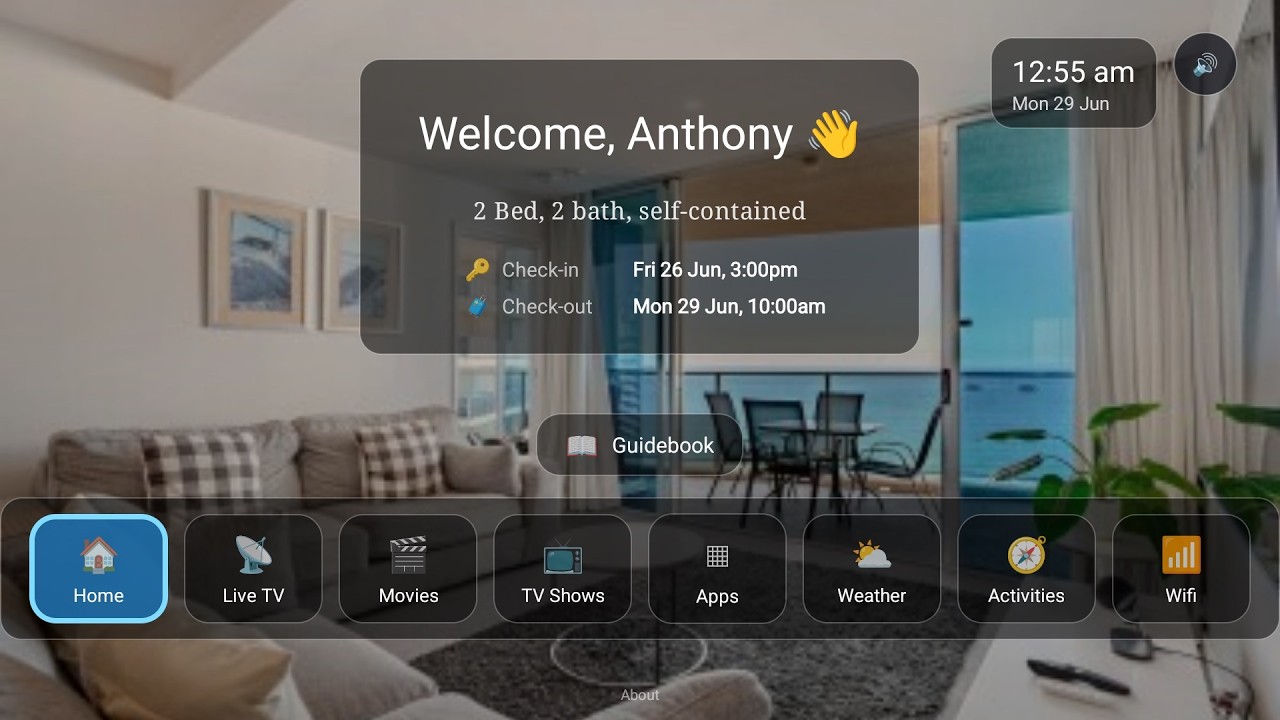
Mews runs your reservations, but it has no in-room TV or tablet guest screen of its own. BetterSTR TV is a hotel launcher for Android TV and Google TV, and with Mews connected, the TV in every room knows who's staying and when:
- Welcome by name: greets each guest by name, keyed to their Mews reservation and room, and shows their stay dates.
- Guidebook on the big screen: your hotel information and local recommendations, browsable with the TV remote.
- WiFi QR on screen: guests point their phone at the TV and they're connected.
- Local activities and weather: things to do nearby and the forecast for their stay.
- Casting and streaming apps: guests watch their own content on the room TV.
- Upsells: your extras, shown where guests are already looking.
- Clears between stays: the next guest starts fresh.
Watch the Video
Turn your TV into a 5-star guest experience
See the full rundown on the BetterSTR TV page and our hotel page, or the companion tablet if you'd rather put it on a bedside screen.
What it costs
- No setup fee for the Mews connection, and it works on every BetterSTR plan, like our other PMS integrations.
- The digital guidebook and the TV welcome screen are free, forever.
- Premium guidebook: 50c per reservation, or $2.99 per room a month.
- BetterSTR TV Premium: $4 per TV a month, from $2 a month prepaid over several years.
Hotels can also ask us for a per-room quote. Full details are on our pricing page.
Good to know
- One Mews hotel per BetterSTR account. Mews portfolio (multi-property) tokens aren't supported yet.
- Guests don't get messages through Mews: Mews has no guest messaging for partners, so guests get their guide by BetterSTR email and SMS.
- Door PINs come across only when your lock system writes them into Mews.
- Only accommodation reservations sync, not parking or spa bookings.
The step-by-step help article walks through each screen, and you can browse all BetterSTR integrations to see what else connects.