iReservation now connects to BetterSTR, and like every BetterSTR integration it is included in the free plan.
iReservation is the booking calendar and channel manager from the team behind Bed-and-Breakfast.it, one of Italy's best-known B&B sites. Hosts use it to keep Bed-and-Breakfast.it, Booking.com, Airbnb, Expedia and their own direct bookings on one calendar. We built the integration because a host with twelve apartments asked for it, and the iReservation team gave us partner access the same week. It is marked beta while the first hosts use it.
Every channel, one connection
Because iReservation is your channel manager, connecting it brings in all of your bookings at once, whichever site the guest booked on. Each booking comes with the guest's name, email and phone, their country and language, the dates, adults and children, the channel it came from, the price and the tourist tax. Cancelled bookings come through as cancelled and their scheduled messages stop.
Every room gets its own guide and its own TV
A guesthouse with six rooms needs six welcomes, not one. BetterSTR turns every room or apartment in your iReservation calendar into its own property, so the TV in the Camera Doppia greets the guest staying in the Camera Doppia. Rooms arrive switched off: you turn on the ones that have a TV or need a guide.
- Bookings for several rooms show up on each of their rooms, so a family that books two rooms is welcomed in both.
- Room changes follow automatically. Move a guest to another room in iReservation and their welcome moves with them.
- Your property's name and address are entered once when you connect, because iReservation only shares room names. They set the map, weather and nearby places in every guide.
Changes arrive within 15 minutes
BetterSTR checks iReservation for new, changed and cancelled bookings every 15 minutes, and re-reads your rooms once a day. If you need something straight away, the iReservation page in BetterSTR has a Sync Reservations button.
The guide link goes to the guest
Each booking gets a unique guidebook link, personalised to that guest, that room and those dates. BetterSTR sends it by email or SMS with your notification rules. iReservation only lets partners change direct bookings, so the link isn't saved on the booking itself.
It's not just guidebooks
Once connected, the whole BetterSTR stack works off the same booking data:
- Digital guidebooks: branded, multi-language, no app download for guests.
- BetterSTR TV welcome screens: greet guests by name on the TV in their room (more below).
- WiFi QR codes: guests scan and they're online, no password hunting.
- Guest verification: confirm who's actually staying before check-in.
- SMS and email automation: timed messages keyed off each booking's dates.
- Upsells: early check-in, late check-out, breakfast and local extras, offered inside the guide.
The highlight: your TVs become the guest experience
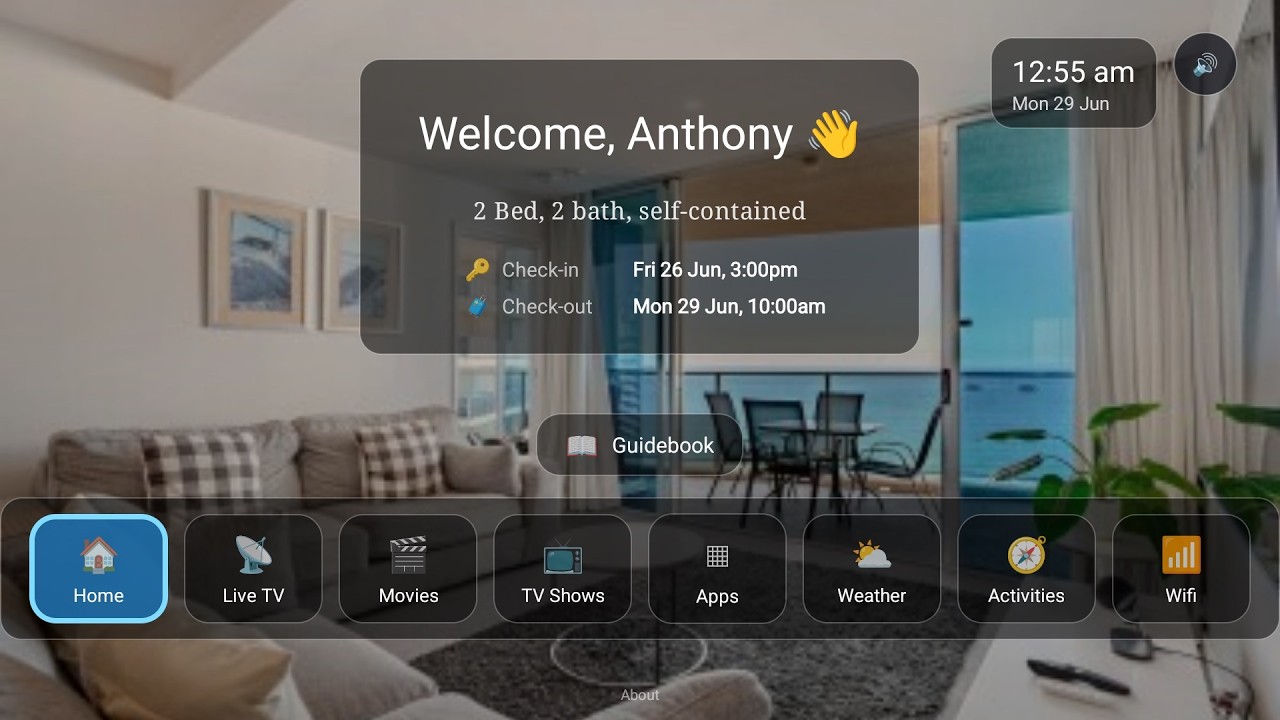
iReservation doesn't put anything on the TV in your rooms. With BetterSTR connected, the TV in every room knows exactly who's staying and when, and turns itself into a five-star welcome:
- Personal welcome screen: greets each guest by name for the exact dates of their booking, switching over automatically between stays.
- Guidebook on the big screen: house info, breakfast times, check-out instructions and local recommendations, browsable with the normal TV remote.
- WiFi QR on screen: guests point their phone at the TV and they're connected.
- Local activities, weather and upsells: things to do nearby, the forecast for their stay, and your extras right where guests are already looking.
- Runs on affordable hardware: any Android TV / Google TV device, or the plug-and-play BetterSTR TV stick from our shop.
Watch the Video
Turn your TV into a 5-star guest experience
See the full rundown on the BetterSTR TV page, or the guest tablet if you would rather put it on a bedside screen.
How to connect (a few minutes)
- Sign in to your Bed-and-Breakfast.it account and open the Channel Manager page. Note your calendar ID.
- On the same page, set an API username and password. They must be different from your extranet login.
- In BetterSTR, go to Integrations → iReservation and enter the calendar ID, username and password, plus your property's name and address.
- Click Sync Properties, then switch on the rooms that have a TV or need a guide. Their bookings follow. Pop your WiFi details and photos into BetterSTR and you're done.
The iReservation integration page lists exactly what syncs and what doesn't.
Common questions
Does this cost anything on the BetterSTR side?
No. All BetterSTR integrations, iReservation included, are part of the free plan with unlimited properties.
Is the API password my Bed-and-Breakfast.it password?
No. You set a separate API username and password on the Channel Manager page, and they must be different from your extranet login. They only let BetterSTR read your rooms and bookings.
Why don't my photos and WiFi password come across?
iReservation doesn't share them. Add them once on the property in BetterSTR and no sync will overwrite them.
Do guests need to download an app?
No. Guidebook links open in any browser, and the unique per-booking link is generated automatically for every booking that syncs.
Browse all BetterSTR integrations to see what else connects.