Beds24 now connects to BetterSTR, and like every BetterSTR integration it is included in the free plan.
We built it because one of our hosts was moving their properties to Beds24 and didn't want to lose their guides and TV welcome screens on the way. Beds24 is a booking and channel management system used by holiday lets, B&Bs, hostels and small hotels, connecting to Airbnb, Booking.com, Vrbo, Expedia and a long list of other channels.
One invite code, and you choose what we see
Beds24 lets you grant access yourself. You create an invite code in your own account under Settings > Marketplace > API, tick the permissions you're happy to give, and paste the code into BetterSTR. There is no marketplace app to install, no partner listing and no approval queue.
We ask for read access to your properties and bookings, guest contact details so guides and messages can be personalised, and write access to bookings so we can save the guide link on each booking. Leave write access off and everything else still works.
Every room type gets its own guide
Plenty of Beds24 hosts keep several apartments as room types under one Beds24 property. Each of those needs its own guide, door code and TV, so BetterSTR treats every room type as its own property. A single holiday home maps one to one, and a block of apartments shows up as one property per apartment, ready for its own guidebook.
- Properties sync with your Beds24 content: address and map pin, guest numbers, check-in and check-out times, bedrooms, beds and bathrooms from your room features, house rules, directions, descriptions and location notes.
- Every booking comes through with guest name, email and phone, dates, adults and children, the booking channel and its reference. Cancellations stop the guest's scheduled messages, and blocked dates stay blocks.
- Your Beds24 template variables come along. Hosts often keep arrival notes and other details in Template 1 to 8, and those become guide shortcodes too.
The guide link goes straight onto the booking
The moment a booking syncs, BetterSTR generates a unique guest guidebook link for that stay, personalised to that guest, that room and those dates. It then saves the link onto the booking in Beds24 as an info item called BETTERSTRGUIDE.
That means you can send it from the auto actions you already use in Beds24. Add [BOOKINGINFOCODETEXT:BETTERSTRGUIDE] to a pre-arrival message and every future guest gets their own guide without you lifting a finger. Nothing else on the booking is touched.
Or message guests right in their booking conversation
Prefer BetterSTR to send it? Pick Beds24 guest message in a BetterSTR notification rule and the message goes into the guest's Beds24 conversation, on the channel they booked through. An Airbnb guest gets it in their Airbnb inbox and a Booking.com guest in Booking.com, so you don't need the email address or phone number the channel never shared.
A careful guest on your Beds24 account
Beds24 gives every account a fixed allowance of API calls every five minutes, shared by every app you connect. BetterSTR checks for new and changed bookings every 10 minutes, uses a small slice of that allowance and always leaves room for your channel and lock integrations. If you'd like changes within a minute, you can add our booking webhook to a property in Beds24, and the Beds24 page in BetterSTR shows you the address to paste.
It's not just guidebooks
Once connected, the whole BetterSTR stack works off the same booking data:
- Digital guidebooks: branded, multi-language, no app download for guests.
- BetterSTR TV welcome screens: greet guests by name on the in-property TV (more below).
- WiFi QR codes: guests scan and they're online, no password hunting.
- Guest verification: confirm who's actually staying before check-in.
- SMS and email automation: timed messages keyed off the real arrival and departure times.
- Upsells: early check-in, late check-out and local extras, offered inside the guide.
The highlight: your TVs become the guest experience
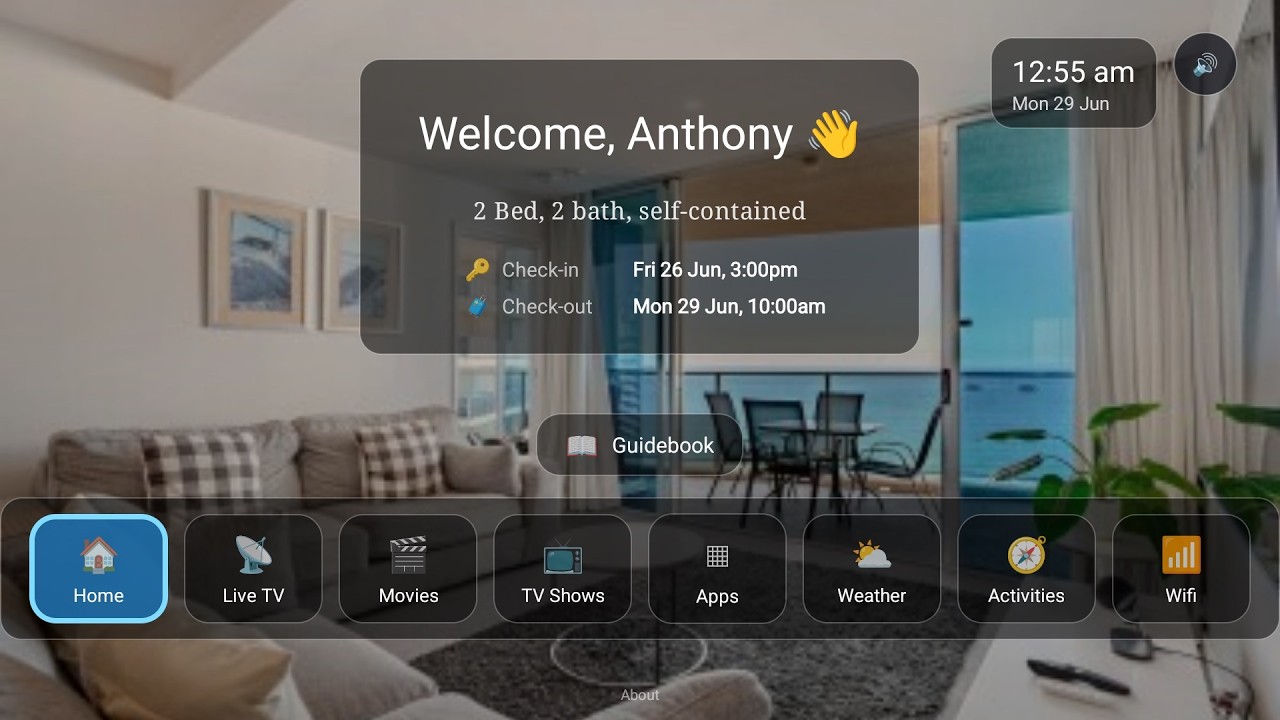
Beds24 doesn't put anything on the TV in your property, and it has no guest tablet either. With BetterSTR connected, the TV in every room knows exactly who's staying and when, and turns itself into a five-star welcome:
- Personal welcome screen: greets each guest by name for the exact dates of their booking, switching over automatically between stays.
- Guidebook on the big screen: house info, check-out instructions and local recommendations, browsable with the normal TV remote.
- WiFi QR on screen: guests point their phone at the TV and they're connected.
- Local activities, weather and upsells: things to do nearby, the forecast for their stay, and your extras right where guests are already looking.
- Runs on affordable hardware: any Android TV / Google TV device, or the plug-and-play BetterSTR TV stick from our shop.
Watch the Video
Turn your TV into a 5-star guest experience
See the full rundown on the BetterSTR TV page, or the guest tablet if you would rather put it on a bedside screen.
How to connect (about two minutes)
- In Beds24, go to Settings > Marketplace > API and click Generate invite code.
- Tick Bookings Read and Write, Bookings personal Read and Properties Read. Leave the IP whitelist empty.
- In BetterSTR, go to Integrations → Beds24 and paste the code straight away. Codes work once and expire after 24 hours.
- Your room types and bookings sync straight away. Add the guide-link variable to a Beds24 auto action, pop your WiFi details and a photo into BetterSTR, and you're done.
The step-by-step help article walks through each screen, and the Beds24 integration page lists exactly what syncs and what doesn't.
Common questions
Does this cost anything on the BetterSTR side?
No. All BetterSTR integrations, Beds24 included, are part of the free plan with unlimited properties.
How fast do booking changes come through?
Within 10 minutes, because BetterSTR checks Beds24 for new and changed bookings that often. Add our booking webhook to a property in Beds24 and changes arrive within about a minute.
Why don't my photos and WiFi password come across?
Beds24 doesn't share property photos or WiFi details through its API. Add them once on the property in BetterSTR and no sync will overwrite them. If you keep WiFi or arrival notes in a Beds24 template, that template is available as a shortcode.
Do guests need to download an app?
No. Guidebook links open in any browser, and the unique per-booking link is generated automatically for every booking that syncs.
Browse all BetterSTR integrations to see what else connects.