We don't usually ship two integrations in one day, but here we are. Hosthub and Uplisting both connect to BetterSTR as of today, and like every BetterSTR integration, both are included in the free plan.
They share the thing we like most in an integration: no gatekeeping. In both platforms you grab an API key from your own account settings, paste it into BetterSTR, and you're syncing. No plan upgrades, no partner approval queues, no waiting.
Hosthub: guidebooks for bookings from 200+ channels
Hosthub (you might remember them as Syncbnb) is a channel manager first and foremost. It keeps your calendars, rates and bookings in sync across more than 200 channels: Airbnb, Booking.com, Vrbo, Agoda and a long tail most channel managers don't touch. That makes it a great match for BetterSTR, because Hosthub is the one place all your bookings converge, whichever channel they came from.
- Rentals sync automatically: name, location, check-in and check-out times, currency and timezone.
- Every booking comes through with guest name, email, phone, party size, dates and the channel it was booked on.
- Always current: BetterSTR checks Hosthub every 10 minutes for new, changed and cancelled bookings.
You create the key in Hosthub under Settings, in the API keys section, and you can revoke it there any time. Full details on the Hosthub integration page.
Uplisting: booking changes within seconds
Uplisting is all-in-one property management for operators who are scaling: channel management, direct bookings, payments and guest messaging in one place. The integration is one of our richest:
- Deep property sync: name, full address, the entire photo gallery, description, amenities, bedrooms, bathrooms and check-in times all flow into your guidebook automatically.
- Bookings with everything attached: guest contact details, party size, dates, booking channel, and even the smart-lock door code for the stay, available as a guide shortcode.
- Webhooks, registered for you: when you connect, BetterSTR registers webhooks on your Uplisting account automatically. New bookings, changes and cancellations arrive within seconds, with an hourly sync as backstop.
Your API key lives at app.uplisting.io/connect/api (Settings → Connect). Copy, paste, done. Full details on the Uplisting integration page.
Every booking gets its own guidebook link
The moment a booking syncs from either platform, BetterSTR generates a unique guest guidebook link for that stay, personalised to that guest, that property and those dates. Drop the link into your message templates once, and every future guest gets their own guide without you lifting a finger.
Guides can also use platform-specific shortcodes. For Hosthub that includes the confirmation code, party size, booking channel and unit name. For Uplisting you also get arrival time and the door code, so a guide can literally hand the guest their entry code at the right moment.
It's not just guidebooks
Once connected, the whole BetterSTR stack works off the same booking data:
- Digital guidebooks: branded, multi-language, no app download for guests.
- BetterSTR TV welcome screens: greet guests by name on the in-property TV (more below).
- WiFi QR codes: guests scan and they're online, no password hunting.
- Guest verification: confirm who's actually staying before check-in.
- SMS and email automation: timed messages keyed off the real check-in and check-out dates.
- Upsells: early check-in, late check-out and local extras, offered inside the guide.
The highlight: your TVs become the guest experience
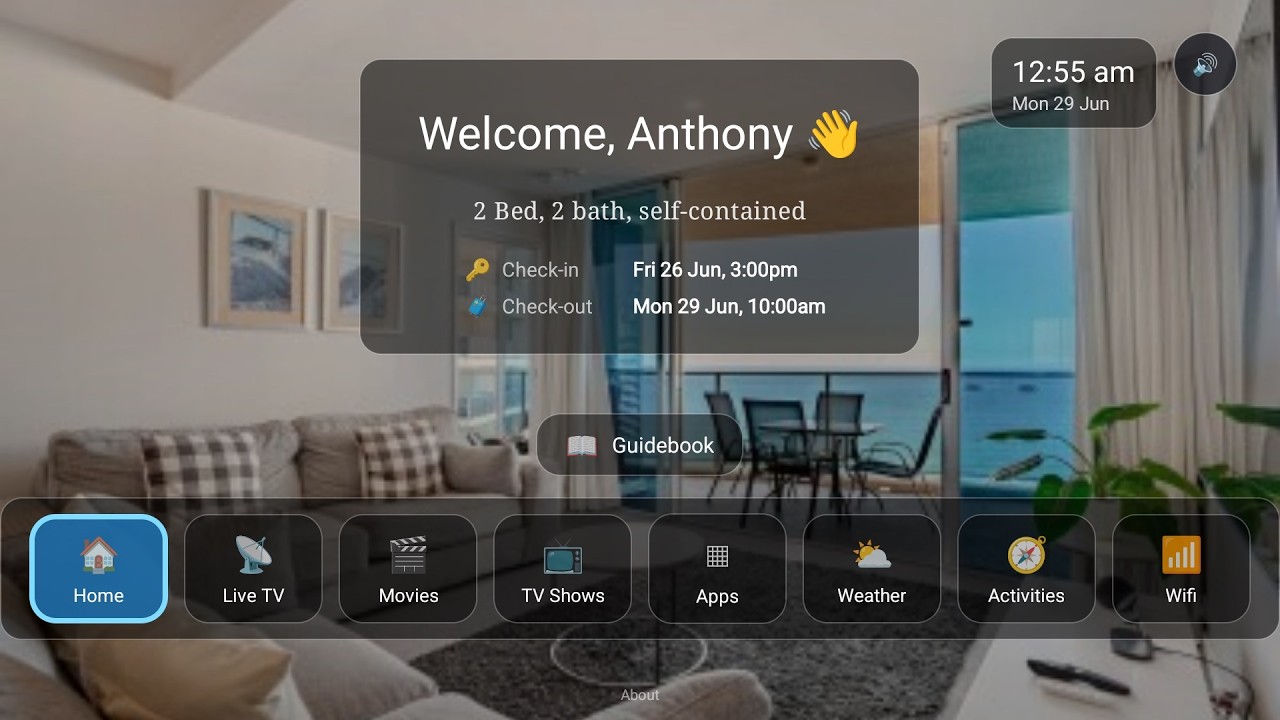
Neither Hosthub nor Uplisting offers an in-property screen tied to the reservation. With BetterSTR connected, the TV in every property knows exactly who's staying and when, and turns itself into a five-star welcome:
- Personal welcome screen: greets each guest by name for the exact dates of their booking, switching over automatically between stays.
- Guidebook on the big screen: house info, check-out instructions and local recommendations, browsable with the normal TV remote.
- WiFi QR on screen: guests point their phone at the TV and they're connected.
- Local activities, weather and upsells: things to do nearby, the forecast for their stay, and your extras right where guests are already looking.
- Runs on affordable hardware: any Android TV / Google TV device, or the plug-and-play BetterSTR TV stick from our shop.
Watch the Video
Turn your TV into a 5-star guest experience
See the full rundown on the BetterSTR TV page.
How to connect (about two minutes each)
Hosthub
- Log in to Hosthub, open Settings and find the API keys section. Create a new key and give it a nickname like "BetterSTR".
- In BetterSTR, go to Integrations → Hosthub and paste the key in.
- Your rentals and bookings sync straight away, and BetterSTR keeps checking every 10 minutes from then on.
Uplisting
- Log in to Uplisting and open Settings → Connect (app.uplisting.io/connect/api). Copy your API key.
- In BetterSTR, go to Integrations → Uplisting and paste the key in.
- Your properties and bookings sync straight away, and webhooks are registered automatically so changes arrive within seconds.
Common questions
Does this cost anything on the BetterSTR side?
No. All BetterSTR integrations, Hosthub and Uplisting included, are part of the free plan with unlimited properties.
Do I need a particular plan on Hosthub or Uplisting?
No. Both platforms make API keys self-service on every account. No plan upgrade, no partner approval, no waiting.
How fast do booking changes come through?
Uplisting: within seconds, via webhooks BetterSTR registers for you, with an hourly sync as backstop. Hosthub: BetterSTR checks for changes every 10 minutes, so a new booking is never more than a few minutes away from having its guidebook ready.
Do guests need to download an app?
No. Guidebook links open in any browser, and the unique per-booking link is generated automatically for every booking that syncs.
Want the full feature rundowns? See the Hosthub integration page, the Uplisting integration page, or browse all BetterSTR integrations.