If you run a management rights business, a resort or a portfolio of holiday homes on Resly — Australia's cloud PMS and trust accounting platform — this one's for you. As of today, BetterSTR connects directly to Resly, and like every BetterSTR integration, it's included in the free plan.
Paste your Resly API key and Account ID into BetterSTR, and your whole complex comes across: every room or holiday home with its bedrooms, photos and amenities — and here's the special part — the WiFi network and password, check-in and check-out instructions, key number and carpark allocation you already keep against each unit in Resly. Most PMSs don't expose any of that; Resly does, and BetterSTR drops it straight into each unit's guidebook. No re-typing, no spreadsheets.
What actually syncs
- Rooms & holiday homes: every unit with its room type, bedrooms, bathrooms, occupancy, photos and amenities — each one becomes its own guidebook.
- Unit-level details: WiFi name and password, check-in/check-out instructions, key number and carpark — pulled per unit from Resly, so Unit 202's guide shows Unit 202's WiFi.
- Reservations: guest names and contact details, stay dates, arrival and departure time windows, party size, booking channel (Airbnb, Booking.com, direct and more), balances and even door PINs where you use them.
- Changes, as they happen: BetterSTR registers Resly webhooks automatically at connect time — no copy-paste step — so new bookings, changes and cancellations land within moments. An hourly sync runs as a backstop, so nothing slips through.
Every booking gets its own guidebook link
The moment a reservation syncs, BetterSTR generates a unique guest guidebook link for that stay — personalised to that guest, that unit and those dates. Drop the link into your guest communications once, and every future guest gets their own guide without you lifting a finger.
Your guides can also use Resly-specific shortcodes: reservation reference, arrival window, booking channel, key number, carpark, outstanding balance and more. So a guide can open with the guest's actual arrival window and their unit's parking spot rather than a generic hello.
It's not just guidebooks
Once Resly is connected, the whole BetterSTR stack works off the same reservation data:
- Digital guidebooks — branded, multi-language, no app download for guests.
- BetterSTR TV welcome screens — greet guests by name on the in-room TV (more on this below).
- WiFi QR codes — generated from the WiFi details already in Resly. Guests scan and they're online.
- Guest verification — confirm who's actually staying before check-in.
- SMS and email automation — timed messages keyed off the real arrival and departure dates from Resly.
- Upsells — early check-in, late check-out and local extras, offered inside the guide.
The highlight: every room's TV becomes the guest experience
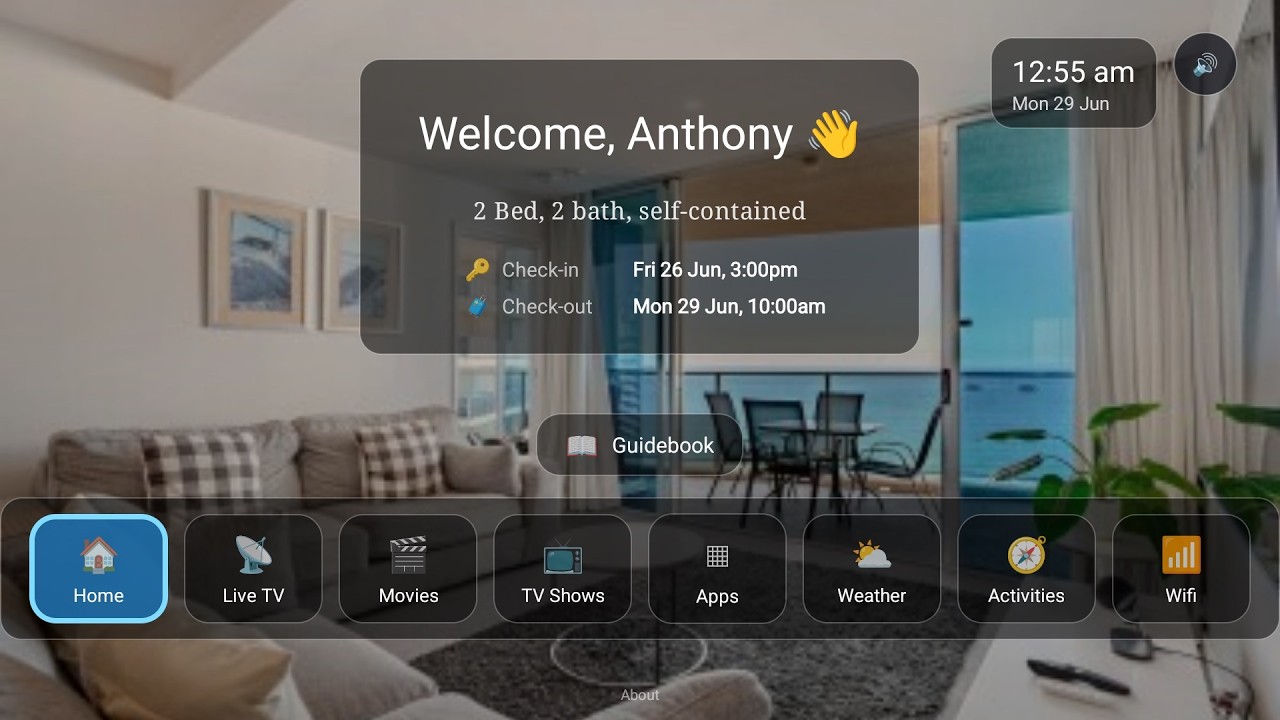
Here's the part no PMS gives you — and for resorts it's a genuine difference-maker. Resly doesn't offer a fully integrated in-room screen: there's no tablet companion and no TV service tied to the reservation. With BetterSTR connected to Resly, the TV in every unit knows exactly who's staying and when, and turns itself into a five-star welcome:
- Personal welcome screen — greets each guest by name for the exact dates of their Resly reservation, automatically switching over between stays.
- Guidebook on the big screen — house rules, check-out instructions and local recommendations, browsable from the couch with the normal TV remote.
- WiFi QR on screen — guests point their phone at the TV and they're connected. No laminated cards at reception, no password questions.
- Local activities, weather and upsells — things to do nearby, the forecast for their stay, and your extras (late check-out, mid-stay clean) right where guests are already looking.
- Runs on affordable hardware — any Android TV / Google TV device, or the plug-and-play BetterSTR TV stick from our shop. Roll it out one unit at a time or across the whole complex.
Watch the Video
Turn your TV into a 5-star guest experience
See the full rundown on the BetterSTR TV page.
Where Resly ends and BetterSTR begins
Resly's strength is running the business: trust accounting that keeps your auditor happy, channel management, owner statements and a slick direct booking engine. What it doesn't have is the in-property layer — the reservation-aware TV service above, the tablet companion, the WiFi QR on the fridge, ID verification, and upsells that run themselves. BetterSTR sits alongside Resly as exactly that layer. Keep running your trust accounting and channels in Resly; let BetterSTR handle what guests see and touch during the stay.
How to connect (about two minutes)
- Grab your Resly API Key and Account ID (your Account ID is your Resly property identifier, e.g.
resly-resort). If you don't have an API key yet, email Resly at integrations@resly.com.au and ask for Open API access. - In BetterSTR, go to Integrations → Resly and paste them in.
- That's it — webhooks register automatically, and your rooms and reservations start syncing straight away.
Common questions
Does this cost anything on the BetterSTR side?
No. All BetterSTR integrations — Resly included — are part of the free plan.
What do I need from Resly?
An API key and your Account ID. If you can't find your key, ask Resly support (integrations@resly.com.au) to enable Open API access for your account.
How fast do booking changes come through?
Near real-time — BetterSTR registers Resly webhooks automatically when you connect, so new reservations, changes and cancellations arrive within moments. An hourly full sync catches anything a webhook might miss.
We're a resort with 40 units under management — does that work?
That's exactly the shape Resly is built for, and BetterSTR mirrors it: every room becomes its own guidebook with its own WiFi details, key number and carpark from Resly, and the TV in each unit greets whoever is checked into that room. Holiday homes with their own street addresses work just as well — each listing keeps its own location, photos and details.
Do guests need to download an app?
No. Guidebook links open in any browser, and the unique per-booking link is generated automatically for every reservation that syncs from Resly.
Can I choose which rooms have guidebooks?
All rooms on your Resly account sync across (long-term tenancy units are automatically left out), and you control which ones have active guidebooks, TV displays and messaging inside BetterSTR.
Want the full feature rundown? See the Resly integration page, or browse all BetterSTR integrations.