If Smoobu keeps your calendars in sync across Airbnb, Booking.com, Vrbo and Expedia, this one's for you. As of today, BetterSTR connects directly to Smoobu — and like every BetterSTR integration, it's included in the free plan.
Create an API key in your Smoobu settings, paste it into BetterSTR, and your whole portfolio comes across: every property with its address, rooms, occupancy and amenities — plus every booking, with guest details, arrival and departure times, and the channel it came from (Airbnb, Booking.com, Vrbo, Expedia or direct). No spreadsheets, no re-typing your listings into yet another tool.
What actually syncs
- Properties: address, location, bedrooms, bathrooms, occupancy and amenities — everything BetterSTR needs to build a guidebook that already knows your place.
- Bookings: guest names and contact details, stay dates and times, party size, prices and which channel the booking came from.
- Changes, as they happen: paste your personal BetterSTR webhook URL into Smoobu's settings (shown on the integration page, one-time step) and new bookings, changes and cancellations land in BetterSTR within moments. An hourly sync runs as a backstop, so nothing slips through.
Every booking gets its own guidebook link
This is the part that saves you the most time. The moment a booking syncs, BetterSTR generates a unique guest guidebook link for that stay — personalised to that guest, that property and those dates. Drop the link into your Smoobu message templates once, and every future guest gets their own guide without you lifting a finger.
Your guides can also use Smoobu-specific shortcodes: confirmation ID, party size, booking channel, even the guest's language. So a guide can open with “Welcome, party of 4 — here's everything for your stay” rather than a generic hello.
It's not just guidebooks
Once Smoobu is connected, the whole BetterSTR stack works off the same booking data:
- Digital guidebooks — branded, multi-language, no app download for guests.
- BetterSTR TV welcome screens — greet guests by name on the in-property TV (more on this below).
- WiFi QR codes — guests scan and they're online, no password hunting.
- Guest verification — confirm who's actually staying before check-in.
- SMS and email automation — timed messages keyed off the real arrival and departure dates from Smoobu.
- Upsells — early check-in, late check-out and local extras, offered inside the guide.
The highlight: your TV becomes the guest experience
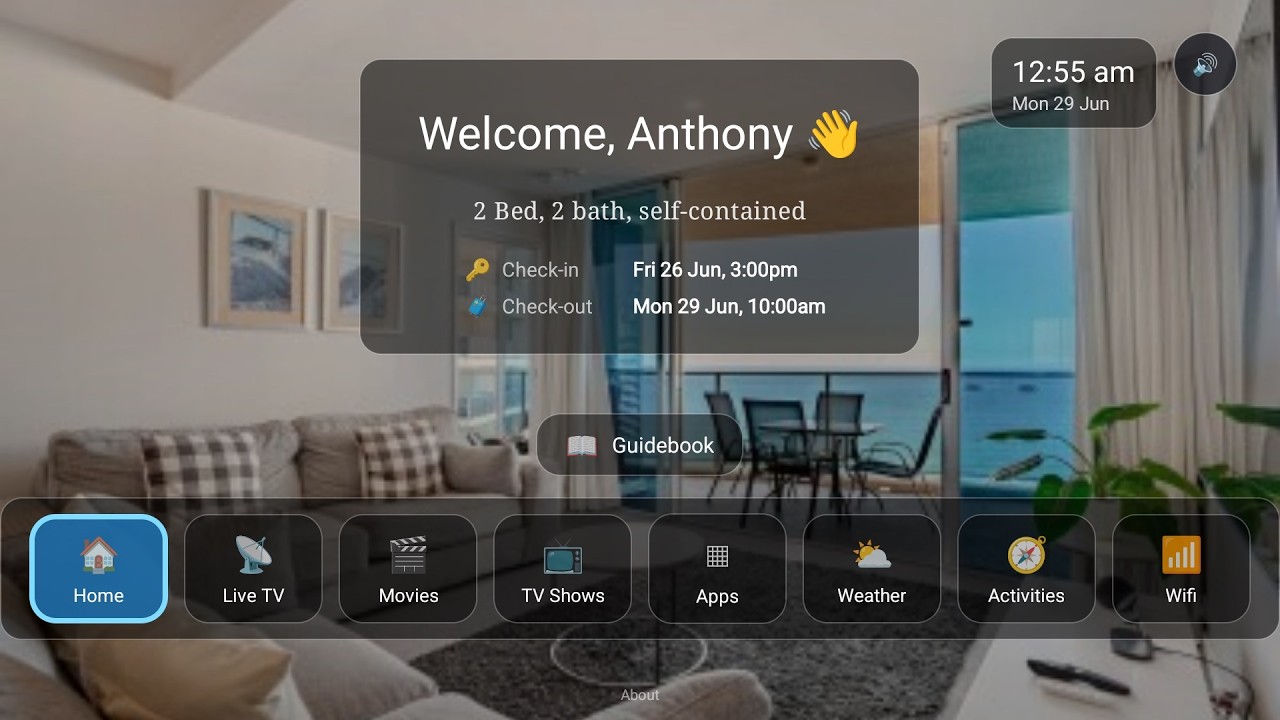
Here's the part no channel manager gives you. Smoobu doesn't offer a fully integrated in-property screen — there's no tablet companion and no TV service tied to the booking. With BetterSTR connected to Smoobu, the TV in your rental knows exactly who's staying and when, and turns itself into a five-star welcome:
- Personal welcome screen — greets each guest by name for the exact dates of their Smoobu booking, automatically switching over between stays.
- Guidebook on the big screen — house manual, check-out instructions and local recommendations, browsable from the couch with the normal TV remote.
- WiFi QR on screen — guests point their phone at the TV and they're connected. No laminated cards, no password questions.
- Local activities, weather and upsells — things to do nearby, the forecast for their stay, and your extras (late check-out, mid-stay clean) right where guests are already looking.
- Runs on affordable hardware — any Android TV / Google TV device, or the plug-and-play BetterSTR TV stick from our shop.
Watch the Video
Turn your TV into a 5-star guest experience
See the full rundown on the BetterSTR TV page.
Wait — doesn't Smoobu have a guest guide?
It does, and it's a fine start. Smoobu's core strength is the channel manager: calendars, rates and availability synced everywhere, with a solid booking website on top. What it doesn't have is the in-property layer — the reservation-aware TV service above, the tablet companion, the WiFi QR on the fridge, ID verification, and upsells that run themselves. BetterSTR sits alongside Smoobu as exactly that layer. Keep running your business in Smoobu; let BetterSTR handle what guests see and touch during the stay.
How to connect (about two minutes)
- Log in to Smoobu and open Settings → Advanced → API Keys. Create a key, generate its secret, and copy both.
- In BetterSTR, go to Integrations → Smoobu and paste them in.
- Optionally (recommended), copy your personal webhook URL from the same page into Smoobu's API settings for instant booking updates.
One note on the Smoobu side: API access comes with their paid Professional plan. If you don't see API Keys under Settings → Advanced, ask Smoobu support about API access.
Common questions
Does this cost anything on the BetterSTR side?
No. All BetterSTR integrations — Smoobu included — are part of the free plan.
What do I need from Smoobu?
An API key and secret, created under Settings → Advanced → API Keys in your Smoobu account. The secret is shown once when you generate it — if you lose it, just generate a new one.
How fast do booking changes come through?
Near real-time once you've pasted your BetterSTR webhook URL into Smoobu's settings — Smoobu notifies us the moment a booking is created, changed or cancelled. An hourly full sync catches anything a webhook might miss (and covers you even if you skip the webhook step).
Do guests need to download an app?
No. Guidebook links open in any browser, and the unique per-booking link is generated automatically for every reservation that syncs from Smoobu.
Can I choose which properties sync?
All properties on your Smoobu account sync across, and you control which ones have active guidebooks, TV displays and messaging inside BetterSTR.
Want the full feature rundown? See the Smoobu integration page, or browse all BetterSTR integrations.