OPERA Cloud is Oracle's hotel property management system, and it runs the front desk at everything from boutique hotels to large chains. It now connects to BetterSTR.
We've had hotels asking for this for a while. They loved what BetterSTR TV and our guidebooks do for holiday lets, but their reservations live in OPERA, and nobody wants to retype guest names into a second system. Now they don't have to.
Connected through Oracle, approved by you
The connection goes through Oracle Hospitality Integration Platform (OHIP), the way Oracle lets partners connect to OPERA Cloud. There's no API key to hunt down and paste. Instead:
- You send us your Hotel ID, Enterprise ID and region from the OPERA Cloud page in BetterSTR. None of them are passwords.
- We request a connection to your OPERA Cloud environment.
- Your OHIP administrator approves BetterSTR in the OHIP Developer Portal, under Environments > Partner Connections. One click, and it can be withdrawn there at any time.
- We switch it on, and your rooms and reservations come across.
Your OHIP access comes with your OPERA Cloud licence, and Oracle bills the integration partner for API calls, not the hotel. So connecting BetterSTR adds nothing to your Oracle bill.
Every room is its own property
This is the part we're proudest of. A TV in room 214 should welcome room 214's guest, not whoever happens to be first on the hotel's list. So BetterSTR reads your rooms from OPERA and makes each one its own property, with its room type, floor, beds and maximum guests.
- Each room gets its own guide link and its own TV welcome, personalised from that room's reservation.
- Reservations follow the room. Many hotels only assign a room number close to arrival. Until then the reservation waits on the hotel itself, so pre-arrival messages still go out, and the moment OPERA assigns a room it moves across and that room's TV picks up the guest.
- You choose which rooms are on. New rooms start switched off, and you turn on the rooms that have a TV or need guides.
- Hotel details come along: name, address, phone, email, website, timezone, currency and check-in times, plus guest names, emails and phone numbers from each reservation. Card details, ID numbers and home addresses are never stored.
Changes arrive from OPERA's own change feed
BetterSTR reads OPERA's change feed, so new, changed and cancelled reservations come through within 30 minutes, and cancelled stays stop their scheduled messages. Need it faster? We can check your hotel more often, but every check is a call Oracle charges us for, so we set that up with each hotel. And if you need something right now, the OPERA page in BetterSTR has a Sync Reservations button.
The guide link, right on the reservation
BetterSTR generates a unique guidebook link for every stay and can save it onto the OPERA reservation as a comment called BetterSTR guide, so your front desk can see it and hand it out. We switch that on once we've tested it with your hotel. Guests also get their link by email or SMS from your BetterSTR notification rules, timed off their real arrival.
It's not just guidebooks
Once connected, the whole BetterSTR stack works off the same reservation data:
- Digital guidebooks: branded, multi-language, no app download for guests.
- BetterSTR TV welcome screens: greet guests by name on the in-room TV (more below).
- WiFi QR codes: guests scan and they're online, no password hunting at the front desk.
- SMS and email automation: timed messages keyed off the real arrival and departure times.
- Upsells: late check-out, breakfast and local extras, offered inside the guide.
The highlight: your TVs become the guest experience
OPERA Cloud runs your front desk beautifully, but it doesn't put anything on the TV in the room, and it has no in-room tablet. With BetterSTR connected, the TV in every room knows exactly who's staying and when, and turns itself into a five-star welcome:
- Personal welcome screen: greets each guest by name for the exact dates of their stay, switching over automatically between guests.
- Guidebook on the big screen: hotel information, check-out instructions and local recommendations, browsable with the normal TV remote.
- WiFi QR on screen: guests point their phone at the TV and they're connected.
- Local activities, weather and upsells: things to do nearby, the forecast for their stay, and your extras right where guests are already looking.
- Runs on affordable hardware: any Android TV / Google TV device, or the plug-and-play BetterSTR TV stick from our shop.
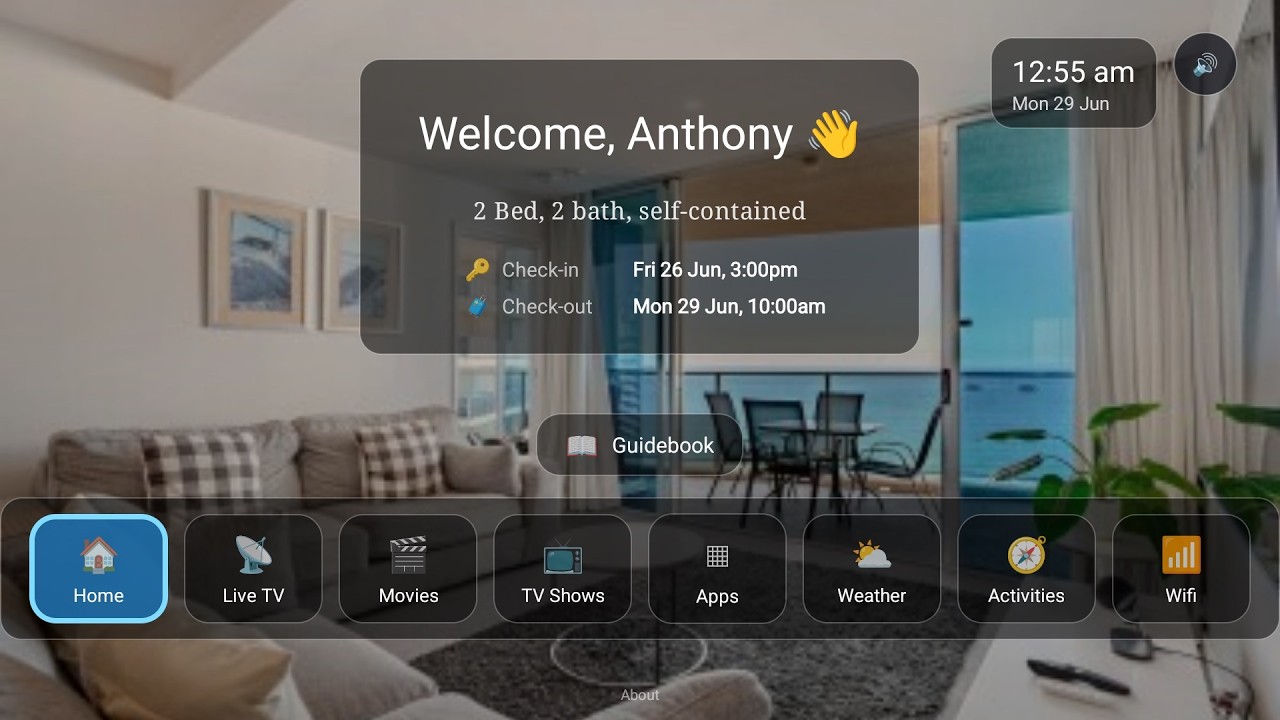
Watch the Video
Turn your TV into a 5-star guest experience
See the full rundown on the BetterSTR TV page, or the guest tablet if you'd rather put it on a bedside screen.
What it costs
Most BetterSTR integrations are on the free plan. OPERA is different, because Oracle charges us for every call we make to OPERA. So OPERA reservations sync on a paid plan, per room:
- Premium Guides at 50c per reservation, or $2.99 per room a month.
- BetterSTR Simple, our all-in plan, per room.
- Premium TV features are $3.00 per TV a month with Premium Guides, and included in Simple. The TV welcome screen itself is free.
Your hotel and room details sync either way, so you can see the connection working before you choose. Full details are on our pricing page.
Common questions
Do I need OPERA Cloud, or does OPERA 5 work?
You need OPERA Cloud. The connection goes through OHIP, which is part of OPERA Cloud Foundation. Hotels still on the installed OPERA 5 can't connect this way.
Do guests need to download an app?
No. Guidebook links open in any browser, and the TV needs nothing from the guest at all.
Why don't my photos and WiFi password come across?
OPERA Cloud doesn't share photos or WiFi details through OHIP. Add them once in BetterSTR and no sync will overwrite them.
Can we connect more than one hotel?
Yes. A group can connect several hotels to one BetterSTR account, and each hotel's rooms show up as their own properties.
The OPERA Cloud integration page lists exactly what syncs and what doesn't, and you can browse all BetterSTR integrations to see what else connects.